
Cyber Combat Kit Documentation
How to use it, how to set it up, what every part does and how to adapt it to your game. New here? Start with Your first fight in 5 minutes.
Nothing matches that search.
Part 1. Getting started
What's in the kit #
Cyber Combat Kit is a top-down action combat system for Unity 6 with URP. Drag in a humanoid model, click a few buttons and you have a hero fighting waves of enemies.
| Item | Amount |
|---|---|
| Level up boosts | 42 |
| Equipment chips | 36, in 9 slots, levels 1 to 4 |
| Ready-made enemies | 21 (11 World 1, 10 World 2), 5 behaviours, plus a Training Dummy |
| Example companions | 3: Knight, Ranged, Healer |
| Status effects | 4: Burn, Freeze, Weakness, Frailty |
| Sword | 3 hit combo, plus 4 charged specials |
| Editor tools | 6: Setup Wizard, Check Setup, Hero Animations, Boost and Chip Creator, Effect Maker, Sound Library |
| Wired sounds, no clips | 67 entries in the Sound Library |
| Hero levels | 100 |
| Code | 117 C# files, 19,982 lines, source included |
| Content | 71 prefabs, 140 materials, 136 PNG, 38 animation clips, 26 FBX, 1 demo scene |
| Folder size | 184 MB on disk, 567 files |
What's not in the kit
No audio files, save system, currency, inventory, levels, ready-made bosses or player jump. Damageable.isBoss exists, but no prefab uses it and there is no boss bar.
Arenas, expeditions, crafting, training mode and hardcore mode belong to the game Cyberhero Legends. They are not in the kit.
Requirements
- Unity 6. The kit was made and tested on 6000.6.5.
- Universal Render Pipeline (URP) is what the kit is made for. You install it and set the URP Asset. For Built-in or HDRP, see Installing.
- Input System, Unity UI with TextMeshPro and AI Navigation. The kit offers to install these.
Tested in Play Mode in the Unity Editor (731 automated checks, 149 wizard checks) and on a Windows build. This combat system runs on phones in Cyberhero Legends, our Android game. Touch controls are included: test them on your target devices too.
Folders
| Folder | Contents |
|---|---|
Prefabs | Hero, Companions, Enemies (World 1, World 2, Training Dummy), Projectiles, Pickups, Managers and VFX. |
Characters | Models, materials, textures and animators of the hero, companions and enemies. |
VFX | Effect materials, textures, meshes and sword slash animations. Unity shaders only. |
Audio | The Sound Library (no clips) and the audio mixer. |
UI | Skill and companion icons, the TextMesh Pro font and UI textures. |
Data | Skill Database, Hero Stats Table and the Chip Library. |
Demo | Combat Demo scene, its NavMesh and floor materials. |
Scripts | Runtime (combat), Editor (tools) and DynamoBone (bone physics of the hero ponytail). |
Documentation | DynamoBone.md. |
Installing #
You will get: the kit compiled and the Setup Wizard open.
Before you start: a Unity 6 project, ideally with URP. The kit does not install URP.
Using Built-in or HDRP: the kit materials use URP shaders, so they show pink until you swap them for shaders of your pipeline. The Render Pipeline item of the Project tab stays red, and you can ignore it once your materials are converted.
- Import the package. The kit lives in
Assets/Zeuk Games/CyberCombatKit. - A message lists the Unity packages the project is missing. Click Install. The kit stays off until they are installed.
- If you clicked Later, use Tools > Zeuk Games > Cyber Combat Kit > Install Required Packages when you are ready.
- Unity asks to enable the Input System and restart. Accept it.
- The Setup Wizard opens. Fix the items of the Project tab with one click.
It worked if: the Project tab has no red items and says "The project is ready."
If it didn't: see Troubleshooting.
Updating the kit
Everything you create goes to Assets/My Combat Kit, outside the kit folder. New prefabs are full copies, so a kit update does not touch them. For boosts and chips, click Make my own copy in the Boost and Chip Creator first: otherwise they live in kit assets that an update can replace. Check Setup warns about this.
Moving the kit
You can move the kit folder anywhere in the project. Editor tools find it by themselves.
Try the demo #
You will get: every system running in five minutes, with nothing to set up.
Open Demo/Combat Demo.unity, or click Demo Scene at the bottom of the Setup Wizard, then press Play.
| Action | Keyboard / Mouse | Gamepad | Touch |
|---|---|---|---|
| Move | WASD, arrows | Left stick | Virtual stick |
| Sword | J, left click | X (West) | SWORD |
| Gun | K, right click (hold with the Machine Gun chip) | Y, RT | GUN |
| Dash | Space, Left Shift | A, RB | DASH |
| Chips panel | Tab | CHIPS | |
| Companion menu | C | COMPANION | |
| Enemy test panel (demo) | E | ENEMIES | |
| Pause and help | Esc | Start | II |
| Pick a boost | Number keys, click | UI navigation | Tap |
| Debug (Editor and development builds) | F1 level up, F2 boost pick, F3 reset run, F4 touch controls |
A five minute tour
- Move and press Dash. You pass through enemies and can't be hit during the dash.
- Press Sword three times for the combo. The third hit pushes enemies 4 meters.
- Press Gun. It aims at the closest enemy by itself.
- Kill enemies and collect the EXP orbs. When the skill bar fills, the game pauses and shows 3 boost cards.
- Press Tab. Equip Charging Core in the Sword Core slot, set level 4, close the panel, fire 12 shots and attack.
- Press C. Pick a companion and raise its stats with the + buttons.
- Press E. Spawn any of the 21 enemies next to you. Click its color square to use it in the waves.
- Press F1 to level up, F2 for a boost pick, F3 to reset the run and F4 to cycle the touch controls.
F1 to F4 and their pause menu buttons work only in the Editor and in development builds. They never work in release builds. To turn them off in the Editor too, untick Debug Tools on the CombatManager component. The enemy panel (E) exists only in the demo scene.
Your first fight in 5 minutes #
You will get: a new scene where your hero fights waves of enemies.
Before you start: finish Installing. Your own model is optional: it must be rigged, with a Humanoid rig. Mixamo and most store characters have one.
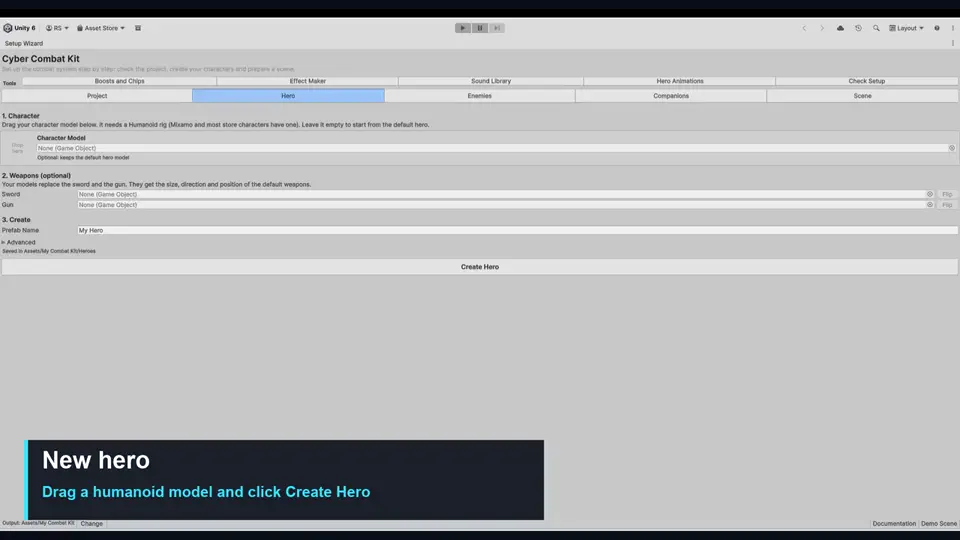
- Open Tools > Zeuk Games > Cyber Combat Kit > Setup Wizard.
- In the Project tab, fix the red items. The yellow items are recommended: name the layers and use Linear color space.
- Using your own model: open the Hero tab, drag it into Character Model and click Create Hero. Using the default hero: skip this step.
- Open the Scene tab. Your new hero is already in Hero Prefab.
- Create or open a scene, click Set Up Scene, or click New Combat Scene to start from an empty one.
- Press Play.
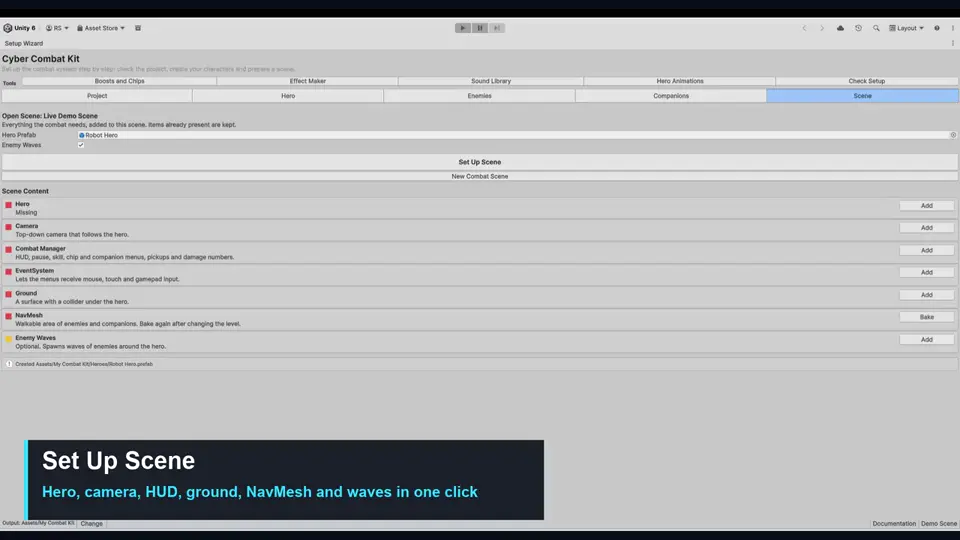
It worked if: you can move, attack and shoot, and enemies appear around you in waves.
If it didn't: open Check Setup. It finds most problems and fixes them with one click. No sound is normal: the kit ships without audio files, see Sound Library.
Concepts #
- Hero: the player character. There is one per scene.
- Boost: an option offered by the level up menu, picked during a run. Also called a skill in the code (
SkillDatabase,HeroSkills). - Chip: equipment. One chip per slot, 9 slots, levels 1 to 4. Equipped from the chips panel or from code.
- EXP: raises the hero level, which raises the base stats.
- Skill EXP: a separate bar that gives boost picks. A run allows 6 picks, and each level of Exp Gain Boost adds 2.
- Run: the current play session. Reset Run clears boosts and Skill EXP, and keeps level and EXP.
- Team: Hero, Enemy or Neutral. It decides who can hurt whom, so the kit does not need special layers or tags for damage.
- Element: Normal, Fire, Ice, Thunder, Frailty or Weakness, on attacks and on characters.
- Status: Burn, Freeze, Weakness or Frailty. Works the same on the hero, enemies and companions.
- Intensity: the distance in meters a hit pushes its target.
- Hit stop: a short freeze of the hero animation when a sword hit lands. It does not change the game time.
Number conventions
- Attack speed and movement speed: 100 = normal.
- Critical chance in percentage points: 5 = 5%. Critical damage is a bonus: 30 = +30%.
- Dodge, drop chance and damage reduction are fractions from 0 to 1 in code.
- A field's value in the code can differ from its value in the prefab, and the prefab is what counts in the game. Example: Pickup
healthPercentis 0.1 in code and 0.25 on the Health pickup.
Part 2. Tools, one by one
Setup Wizard #
Open it from Tools > Zeuk Games > Cyber Combat Kit > Setup Wizard. It also opens after the import.
The top bar opens the other tools: Boosts and Chips, Effect Maker, Sound Library, Hero Animations and Check Setup. The bottom bar shows the output folder, with Change, Documentation and Demo Scene. The output folder is Assets/My Combat Kit by default and must be inside Assets.
Project tab
Each item is green (done), red (required) or yellow (recommended), with a button that fixes it.
| Item | State if missing | Button | What it does |
|---|---|---|---|
| Input System | Red | Enable | Sets Active Input Handling to Both. Unity restarts. |
| TextMeshPro Resources | Red | Import | Imports the TMP essential resources, once per project. |
| AI Navigation | Red | Install | Installs the package that bakes the NavMesh. |
| Layers | Yellow | Name Layers | Names layers 9 (hero and companions) and 23 (enemies). It only names them, no collision changes. |
| Color Space | Yellow | Use Linear | The effects were made in Linear. In Gamma they look washed out or too bright. |
| Render Pipeline | Red | Open Graphics | Opens Project Settings > Graphics. Install URP and set a URP Asset there. |
Open Demo Scene opens the demo.
Hero tab
- Character Model. Drag a rigged character (FBX, or a prefab made from one). Empty keeps the default hero model. The window reports the height. If the rig is not Humanoid, click Make It Humanoid. If Unity can't map the bones, select the model, open its Rig tab and click Configure.
- Model parts. Listed when the model has 2 or more meshes. Untick what you don't want, like a weapon or effect that comes with the model. Unticking everything makes the hero invisible.
- Weapons (optional). Drag a Sword and a Gun. They get the size, direction and position of the default weapons. Click Flip if one points backwards.
- Prefab Name, then Create Hero. Under Advanced, Base Hero picks another hero prefab to copy.
Weapons, effects and sounds move to the same body parts of your model. After creating, the row shows Select, Edit and Add To Scene.
Enemies tab
- Based on. Pick any of the 21 enemies, or the Training Dummy. The new enemy copies its behaviour, attacks and effects.
- Model (optional). Any model works, FBX or prefab. With a model you get Model Scale (the window shows the height in the game; the collider and NavMesh agent follow), Flying and Animator Controller. Scripts of the model are not copied, except DynamoBone. Without a model, Armor Color tints the drone.
- Attacks. Shown for enemies with guns. Projectile changes what the guns shoot (Bomber Bot and Xeno Bot keep their bomb). Change Element sets the element of the hits.
- Stats. Health, Damage and Move Speed.
- Prefab Name, then Create Enemy.
Then click Add To Spawner. Add To Test Panel appears when the scene has one, like the demo.
Companions tab
- Based on. Kit companions and your own. The new one copies its abilities.
- Model (optional). With Model Scale, Flying and Animator Controller. Without a model, Body Color tints the drone.
- Menu. Display Name, Icon and Health. The health you set becomes the level 1 value of the health stat. The other stats copy the base companion.
- Prefab Name, Add To Companion Menu, then Create Companion.
Scene tab
Hero Prefab picks the hero and Enemy Waves adds the spawner. Set Up Scene adds everything the open scene is missing and keeps what is already there. Every step can be undone. New Combat Scene creates a new scene with everything: save it with Ctrl+S.
| Row | What it is | Button |
|---|---|---|
| Hero | The hero prefab. | Add |
| Camera | Top-down camera that follows the hero. | Add |
| Combat Manager | HUD, pause, skill, chip and companion menus, pickups and damage numbers. | Add |
| EventSystem | Lets the menus receive mouse, touch and gamepad input. | Add |
| Ground | A surface with a collider under the hero. If the ground layer doesn't collide with the hero layer, the row says so. | Add or Physics Settings |
| NavMesh | Walkable area of enemies and companions. | Bake or Bake Again |
| Enemy Waves | Optional. Spawns waves around the hero. | Add |
Bake the NavMesh again after changing the level.
Check Setup #
Open it from Tools > Zeuk Games > Cyber Combat Kit > Check Setup, or from the top bar of the wizard. The window answers one question: is everything set up? It checks the project, the open scene, your prefabs and the kit data. Check Again runs it again and Show OK also lists what passed.
| Group | Message | Severity | Button | By hand |
|---|---|---|---|---|
| Project | Input System | Error | Enable | Set Active Input Handling to Both, then restart. |
| Project | TextMeshPro Resources | Error | Import | Window > TextMeshPro > Import TMP Essential Resources. |
| Project | AI Navigation | Error | Install | Add com.unity.ai.navigation in the Package Manager. |
| Project | Render Pipeline | Error | Open Graphics | Install URP and set a URP Asset. |
| Project | Layers | Warning | Name Layers | Name layers 9 and 23. |
| Project | Color Space | Warning | Use Linear | Player Settings > Color Space. |
| Open Scene | There is no hero in the scene. | Error | Set Up Scene | Drop a hero prefab. |
| Open Scene | N heroes in the scene: keep only one. | Error | Delete the extras. | |
| Open Scene | No ground collider under the hero: it will fall. | Error | Add Ground | Add a collider under the hero. |
| Open Scene | The hero has no CharacterController. | Error | Add it, or start from the kit hero. | |
| Open Scene | The hero has no Skill Database (HeroSkills > Database): no level up boosts. | Error | Assign one on HeroSkills. | |
| Open Scene | No Combat Manager (HUD, menus, damage numbers). | Error | Add | Drop the prefab. |
| Open Scene | No Combat Camera. | Error | Add | Drop the prefab. |
| Open Scene | No EventSystem: the menus can't be clicked. | Error | Add | Add an EventSystem with Input System UI Input Module. |
| Open Scene | The EventSystem uses the old input module: use Input System UI Input Module. | Warning | Replace the module. | |
| Open Scene | No NavMesh: enemies and companions can't move. | Error | Bake NavMesh | Bake a NavMesh. |
| Open Scene | The hero is not on the NavMesh: bake it again after changing the level. | Warning | Bake NavMesh | Move the hero or bake again. |
| Open Scene | [Spawner] has no enemies. | Warning | Add enemies to it. | |
| Open Scene | [Spawner] has empty enemy entries. | Error | Remove empty | Remove them in the Inspector. |
| Open Scene | The companion menu has empty entries. | Error | Remove empty | Remove them on CompanionSelector. |
| Open Scene | The enemy test panel has empty entries. | Warning | Remove empty | Remove them on EnemyTestPanel. |
| Open Scene | [Object] has N missing script(s). | Error | Remove | Remove the components. |
| Your Prefabs | [Prefab]: N missing script(s). | Error | Open the prefab and remove them. | |
| Your Prefabs | [Prefab]: N reference(s) to deleted assets (shown as Missing). | Warning | Assign the fields again. | |
| Your Prefabs | [Prefab]: enemy without NavMeshAgent. | Error | Add one. | |
| Your Prefabs | [Prefab]: gun '[name]' has no projectile. | Error | Set projectile or lobProjectile on EnemyGun. | |
| Your Prefabs | [Prefab]: companion without NavMeshAgent. | Error | Add one. | |
| Your Prefabs | [Prefab]: no icon for the companion menu. | Warning | Set the icon. | |
| Your Prefabs | [Prefab]: no Damageable (health). | Error | Add it. | |
| Your Prefabs | [Prefab]: N audio object(s) with no Sound and no clips. | Warning | Pick a Sound on RandomAudio. | |
| Kit Data | The Sound Library is missing. | Error | Create | |
| Kit Data | No sounds yet: the game is silent. Add your clips in the Sound Library (Auto-fill takes a folder). | Warning | Open | Normal right after import. |
| Kit Data | The Sound Library has N empty clip slot(s). | Warning | Remove or fill them. | |
| Kit Data | No Chip Library. | Error | Create | |
| Kit Data | The Chip Library has N deleted chip(s). | Warning | Remove | |
| Kit Data | Chip '[name]' has no effects. | Warning | Edit | Add effects. |
| Kit Data | Your chips are in the kit Chip Library: a kit update would replace them. Use Make my own copy. | Warning | Open | |
| Kit Data | Boost '[name]' has no effects. | Warning | Edit | Add effects. |
| Kit Data | Boost '[name]' has no key: it can't be picked. | Error | Edit | |
| Kit Data | Two boosts share the key '[key]': give one another key. | Error | Rename one. | |
| Kit Data | Your boosts are in the kit Skill Database: a kit update would replace them. Use Make my own copy. | Warning | Open |
Boost and Chip Creator #
Open it from Tools > Zeuk Games > Cyber Combat Kit > Boost and Chip Creator. It has two tabs: Boosts (level up) and Chips. No code needed.
Create a boost
You will get: a new card in the level up menu.
Before you start: a scene with your hero. Click Make my own copy first. It copies the Skill Database to your folder and uses it on the hero of the open scene, so kit updates never replace your boosts.
- Click + New Boost.
- Set Name and Icon.
- Set Max Level: how many times it can be picked. 0 = unlimited, 1 = unique.
- Set Weight: the chance of being offered compared to the others. 1 = normal.
- Tick Gun Boost if it should not be offered when the hero has no gun (Super Charged Sword).
- Click + Add Effect and pick a type. Each effect has one value per level.
- Read the Level up card preview. The text is made from the effects, or write your own in Card Texts (optional).
It worked if: the card appears in the level up menu. Press F2 in the Editor for a pick. It is one option among many, so raise Weight while testing.
Default boosts can also get extra effects: tick Show default boosts and pick one. Changing the text of a default boost does not change what it does.
How the draw works
The menu shows 3 cards (optionsPerLevelUp), drawn without repeats, weighted by Weight. A boost is not offered when it is turned off, at its max level, an aura while another aura is active, a gun boost after Super Charged Sword, or Restore Companion with no companion in need.
Create a chip
Before you start: click Make my own copy in the Chips tab, so kit updates never replace your chips.
- Click + New Chip. Chips are saved in
Assets/My Combat Kit/Chips. - Set Name, slot and icon.
- Add effects with a value for each of the 4 levels.
- Read the Chips panel preview, or write Texts per level (optional).
It worked if: the chip shows up in the chips panel (Tab) by itself. From code, equip it with HeroChips.Equip(chip, level), or add it to HeroChips.startingChips.
Default chips can be renamed, get an icon, get extra effects, or be hidden by unticking In chips panel. Their own effect stays in code. "When Picked" effects only work on boosts, not on chips.
Every effect type
Values are per level. Element 0 is level 1, and higher levels use the last value.
| Type | Value | Card text at value 10 |
|---|---|---|
| Attributes: Damage Percent | Value (%) | +10% damage |
| Attributes: Flat Damage | Damage | +10 damage |
| Attributes: Attack Speed Percent | Value (%) | +10% attack speed |
| Attributes: Flat Attack Speed | Attack speed | +10 attack speed |
| Attributes: Gun Attack Speed Percent | Value (%) | +10% gun attack speed |
| Attributes: Flat Gun Attack Speed | Attack speed | +10 gun attack speed |
| Attributes: Critical Chance | Chance (%) | +10% critical chance |
| Attributes: Critical Damage Percent | Value (%) | +10% critical damage |
| Attributes: Move Speed Percent | Value (%) | +10% movement speed |
| Attributes: Max Health Percent | Value (%) | +10% max HP |
| Attributes: Dodge Chance | Value (%) | +10% dodge |
| Attributes: Damage Reduction | Value (%) | -10% damage taken |
| Attributes: Healing Percent | Value (%) | +10% healing |
| Attributes: Headshot Chance | Value (%) | +10% headshot chance |
| Attributes: Max Ammo | Ammo | +10 max ammo |
| Attributes: Exp Gain Percent | Value (%) | +10% EXP |
| Attributes: Health Drop Chance | Value (%) | +10% health drop chance |
| Attributes: Ammo Drop Chance | Value (%) | +10% ammo drop chance |
| Attributes: Item Drop Chance | Value (%) | +10% item drop chance |
| Attributes: Damage Per Health Lost | Damage per 1% HP lost | +10 damage for each 1% HP lost |
| Attributes: Attack Speed Per Health Lost | Attack speed per 1% HP lost | +10 attack speed for each 1% HP lost |
| On Hit: Burn On Hit | Burn per second (% of the hit) | Hits burn for 10% of the damage per second (5s) |
| On Hit: Freeze On Hit | Slow (%) | Hits slow by 10% (5s) |
| On Hit: Weakness On Hit | Damage reduction (%) | Hits weaken: -10% damage dealt (5s) |
| On Hit: Frailty On Hit | Extra damage taken (%) | Hits apply frailty: +10% damage taken (5s) |
| On Hit: Life Steal | Healed (% of the hit) | Hits heal 10% of the damage |
| On Kill: Heal On Kill | Healed (% max HP) | Kills heal 10% max HP |
| On Kill: Explode On Kill | Explosion damage (% of hero damage) | Kills explode for 10% damage (5m) |
| Over Time: Health Regen | % max HP per second | Regenerate 10% max HP per second |
| When Picked (boosts only): Instant Heal | Healed (% max HP) | Heal 10% max HP now |
| When Picked (boosts only): Refill Ammo | No value | Refill the ammo |
| When Picked (boosts only): Add Shield Charges | Shield charges | +10 shield charges |
| When Picked (boosts only): Restore Companions | No value | Restore your companion |
Fields of an effect: source (Sword and Gun, Sword or Gun), chance from 0 to 100, duration in seconds (for Explode On Kill it is the radius in meters), vfx and sound. Only the fields an effect type uses are shown.
Three complete examples
Vampire Fang, life steal on the sword. Boost, Max Level 3. Effect On Hit: Life Steal, source Sword, chance 100, values 5, 10, 15. Card text: "Sword hits heal 5% of the damage".
Glass Cannon, more damage, less health. Boost, Max Level 1. Effect Attributes: Damage Percent, value 50. Effect Attributes: Max Health Percent, value -30. Card text: "+50% damage. -30% max HP".
Regen Core, a chip with 4 levels. Chip, slot Body. Effect Over Time: Health Regen, values 0.5, 1, 1.5, 2. Panel text: "Regenerate 0.5% max HP per second" at level 1.
Effect Maker #
Open it from Tools > Zeuk Games > Cyber Combat Kit > Effect Maker. It makes a new version of an effect. The original is never changed.
- Effect. Pick from Kit effects, or drag any prefab with particles into Effect prefab.
- Look. Color: Keep Colors, Change Hue (every color takes the hue of the new color and keeps its brightness) or Multiply (tints). Size from 0.1 to 5, Speed from 0.1 to 4 (2 = twice as fast) and Amount from 0.1 to 3 (0.5 = half the particles). Preview in Scene plays it in the Scene view, with no need to select it.
- Create. Set a Name and click Create Effect. The prefab and its recolored materials are saved in
Assets/My Combat Kit/Effects. - Use it. The window lists the prefabs that use the original. Use new effect swaps it in one click. On a kit prefab it warns you, because a kit update would undo the change: do it on your own copy.
Example, a blue bullet that turns green. Pick the bullet effect, choose Change Hue, set a green New Color, click Create Effect, then Use new effect on your enemy or projectile prefab.
Sound Library #
The kit ships with no audio files, and every sound is already wired. Open Tools > Zeuk Games > Cyber Combat Kit > Sound Library and drop your clips in each sound. Every prefab that uses that sound plays them, with no other setup. Several clips in one sound means one at random each time.
- Search filters the list. Sounds are grouped by Hero, Sword, Gun, Skills and Chips, Status Effects, Enemies, Companions, Pickups and UI.
- Each sound has its own volume, plus a master volume.
- A sound with no clips is silent and raises no error.
Auto-fill from a folder
- Put your clips in a folder inside
Assets. - Click Auto-fill from a folder... and pick it.
- The window lists the matches:
sword_swing_01goes to Sword Swing andfootstep_concreteto Footstep. - Click Fill empty sounds or Replace all of these.
Clips with no match are listed, and you can drop them by hand.
One clip on one prefab
To use a different clip on a single prefab, fill Clips on its RandomAudio. It then ignores the library. The inspector of RandomAudio shows which sound it plays and if it has clips.
Loops and mixer
Loops (auras, status effects, healer beam, companion engine) already have Loop on their AudioSource. The Audio Sources use Audio/Combat Audio Mixer.mixer. The Audio Listener stays on the hero, kept by TopDownCamera.audioListener, so 3D sounds are heard from the hero.
A sound on a new object
Add an AudioSource and a RandomAudio, pick the Sound and reference it in the script field, for example EnemyAI.deathAudio.
All 67 sounds
| Id | Sound | Where it plays |
|---|---|---|
| 100 | Footstep | Hero footsteps (walk and run). |
| 101 | Dash | Hero dash. |
| 102 | FireDash | Dash with the Fire Dash chip. |
| 103 | IceDash | Dash with the Ice Dash chip. |
| 104 | ThunderDash | Dash with the Thunder Dash chip. |
| 105 | Dodge | Hero dodges an attack. |
| 106 | HeroHurt | Hero takes damage (voice). |
| 107 | HeroDeath | Hero dies (voice). |
| 108 | HeroAttackVoice | Hero attack shout. |
| 109 | HeroRespawn | Hero spawns or respawns. |
| 110 | LevelUp | Hero levels up. |
| 200 | SwordSwing | Each sword swing of the combo. |
| 201 | SwordHit | Sword hits an enemy. |
| 202 | Special1 | Special attack 1 (Charging Core). |
| 203 | Special2 | Special attack 2. |
| 204 | Special3 | Special attack 3. |
| 205 | Special4 | Special attack 4. |
| 206 | ChargeReady | A Charging Core charge is ready. |
| 207 | ChargingLoop | Loop while charging (loop the AudioSource). |
| 208 | BulletReflect | Sword reflects an enemy bullet. |
| 300 | HeroShot | Hero gun shot. |
| 301 | HeroBulletHit | Hero bullet hits something. |
| 302 | Headshot | Hero bullet headshot. |
| 400 | ShieldUp | Shield skill turns on. |
| 401 | ShieldHit | Shield blocks a hit. |
| 402 | ShieldBreak | Shield breaks. |
| 403 | FireAura | Fire aura skill (loop). |
| 404 | IceAura | Ice aura skill (loop). |
| 405 | ThunderAura | Thunder aura skill (loop). |
| 406 | WeaknessAura | Weakness aura skill (loop). |
| 407 | FrailtyAura | Frailty aura skill (loop). |
| 408 | AuraTick | Each damage tick of an aura. |
| 409 | ChipBomb | Bomb chips (Alpha, Beta, Power Bomb) explode. |
| 500 | BurnLoop | Burning (loop). Hero, enemies and companions. |
| 501 | FreezeLoop | Slowed by ice (loop). |
| 502 | WeaknessLoop | Weakened (loop). |
| 503 | FrailtyLoop | Frail (loop). |
| 504 | FrozenSolid | Freezes solid. |
| 505 | IceShatter | The ice breaks at the end of the freeze. |
| 600 | EnemyAttack | Enemy starts an attack (and the melee swing of Robot Creep / Stinger). |
| 601 | EnemyShot | Enemy gun shot. |
| 602 | EnemyBulletHit | Enemy bullet hits something. |
| 603 | EnemyHit | Enemy takes damage. |
| 604 | EnemyDeath | Enemy dies. |
| 605 | EnemyContactHit | Enemy melee or body hits the hero (Robot Creep, Stinger, Saw Bot, Jumper Bot). |
| 606 | EnemyJump | Jumper Bot jumps. |
| 607 | EnemyLanding | Jumper Bot lands. |
| 608 | EnemyBounce | Saw Bot bounces off a wall. |
| 609 | BombLaunch | Bomb or goo is thrown (Bomber Bot, Xeno Bot). |
| 610 | BombExplosion | Bomb or goo lands. |
| 611 | TeslaCharge | Tesla Tower charges. |
| 612 | TeslaShock | Tesla Tower shocks. |
| 700 | CompanionMove | Companion moving (engine or steps). |
| 701 | CompanionHit | Companion takes damage. |
| 702 | CompanionDeath | Companion is destroyed. |
| 703 | CompanionTeleport | Companion dodges or teleports. |
| 704 | CompanionSwordSwing | Knight Drone sword swing. |
| 705 | CompanionSwordHit | Knight Drone sword hits. |
| 706 | CompanionShot | Ranged / Healer Drone shot. |
| 707 | CompanionBulletHit | Companion bullet hits something. |
| 708 | CompanionDeflect | Knight Drone deflects a bullet. |
| 709 | CompanionHeal | Healer Drone heals. |
| 710 | CompanionHealBeam | Healer Drone beam (loop). |
| 711 | CompanionAuraPulse | Aura companion pulse. |
| 800 | PickupCollect | Health, ammo or EXP pickup collected. |
| 801 | SkillMenuOpen | Level up skill menu opens. |
| 802 | SkillPick | A skill is picked. |
Hero Animations #
Open it from Tools > Zeuk Games > Cyber Combat Kit > Hero Animations. It swaps the hero animations without touching the Animator.
You will get: your clips on the hero, with hits and footsteps at the right moments.
Before you start: add the hero to the open scene, for the preview. Clips must be Humanoid.
- The first time, click Create Backup and Start. Nothing changes in your hero yet.
- Click New Set. It makes an editable copy. The default set is the backup.
- Drop a clip in each action you want to change. An empty action keeps the default animation.
- Click Auto-detect. It plays the clip on the hero and finds the hits (fast weapon hand) and footsteps (foot coming down). Adjust with the sliders.
- Click Preview to check it on the hero in the open scene.
- Clips without root motion: tick Made in place and set the speed in m/s. For walk and run, the window suggests the playback speed that keeps the feet on the ground, with a button like Use x1.23.
- Click Apply to Hero.
It worked if: in Play Mode the hit lands when the blade connects.
To undo: Restore Default Animations puts the original ones back. Use Default does it for one action.
Clips don't need animation events: the moments you mark are sent by HeroAnimationTiming. A clip with its own animation events uses them as they are. Transition times, the sword chase and the dash push follow the new hit times automatically. Applying a set does not change the damage or intensity of a hit (see Sword).
Do not edit Characters/Hero/Animations/Default. It is the backup.
All actions
| Group | Action | What it needs |
|---|---|---|
| Locomotion | Idle | Standing still, sword in the right hand. Must loop. |
| Locomotion | Walk | Slow movement (small stick tilt). Must loop. Can be made in place. |
| Locomotion | Run | Full speed movement. Must loop. Can be made in place. |
| Dash & Dodge | Dash | Quick burst forward. Set Invulnerable until. |
| Dash & Dodge | Dodge | Played when an attack is dodged (dodge stat). |
| Sword Combo | Hit 1 | First sword hit. Mark when the blade hits. |
| Sword Combo | Hit 2 | Second hit, starts while hit 1 ends. |
| Sword Combo | Hit 3 (finisher) | Strongest hit of the combo. |
| Special Attacks | Special 1 | Charged attack 1 (Charging Core chip). Usually a dash strike. |
| Special Attacks | Special 2 | Charged attack 2. |
| Special Attacks | Special 3 | Up to three hits. |
| Special Attacks | Special 4 | Finisher of the special chain. |
| Special Attacks | Special Recovery | Back to the stance after Special 3. |
| Gun | Shoot | One shot. Mark the moment the bullet leaves. |
| Gun | Machine Gun Start | From the shot pose to the rapid fire pose (Machine Gun chip). |
| Gun | Machine Gun Loop | Rapid fire. Must loop. Every shot mark fires a bullet. |
| Gun | Machine Gun End | Lowers the gun. |
| Hurt, Death & Spawn | Hurt, Death, Spawn | Spawn plays when the hero appears or respawns. |
| Jump & Landing | Going Up, Falling | In the air. Must loop. |
| Jump & Landing | Land, Land (high fall), Land Moving, Land Running Fast | Landing variations. |
Common mistakes
- The rig is not Humanoid: the clip does not play on the hero. Set Animation Type to Humanoid in the clip's import settings.
- The hero slides or stands still while moving: the clip has no root motion. Tick Made in place.
- The hit lands too early or too late: adjust the Hit slider, then use Preview.
Part 3. Systems, rule by rule
Hero #
The hero moves by root motion: the Animator moves it and the speed comes from the run clip and the Speed stat. Movement is relative to the world, not to the camera.
Field on HeroController | Prefab value | Meaning |
|---|---|---|
maxForwardSpeed | 8 | Top value of the ForwardSpeed animator parameter. |
gravity | 20 | Fall acceleration. |
dashCooldown | 0.1 | Seconds before the next dash. |
hitStopPerIntensity | 0.085 | Hit stop seconds per point of intensity, kept between 0.06 and 0.18 s. |
hurtArmorTime | 1 | Seconds after being hurt in which another hurt animation can't interrupt you. |
knockbackMultiplier | 0.5 | Meters the hero is pushed per point of intensity, up to 5 m. |
elementalDashRadius | 1.3 | Reach in meters of Fire, Ice and Thunder Dash. |
Dash
The hero can't be hit during the dash and passes through enemies (dashIgnoreLayers). With Double Dash you get 2 dashes before the cooldown. An elemental dash costs 1 ammo. With no ammo it is a normal dash.
Taking damage
Attacking gives armor: being hit does not interrupt a swing. After a hurt animation, there is 1 second of armor. Steel Body removes hurt interruptions. A burn tick always plays the hurt animation. Bullets, burns and auras don't push the hero.
Death and respawn
CombatManager shows the death panel, waits respawnDelay (3 s) and revives the hero at respawnPoint, or where it started. The hero gets 2 seconds of protection. Dying does not change level, boosts, chips or ammo. Without the Combat Manager, call hero.Revive yourself (see recipe 18).
Swap the ponytail physics
The hero ponytail uses DynamoBone. See Component reference and Documentation/DynamoBone.md.
Stats and progression #
Base stats per level are in Data/Hero Stats Table.asset. Edit the asset to rebalance, no code needed. Level 1: 100 HP, 30 damage, 100 speed, 100 attack speed, 5% critical chance, +30% critical damage.
Final stats:
maxHealth      = table x maxHealthMultiplier (minimum 1)
damage         = table x damageMultiplier + flatDamage (minimum 0)
attackSpeed    = table x attackSpeedMultiplier + flatAttackSpeed (minimum 10)
gunAttackSpeed = attackSpeed x gunAttackSpeedMultiplier + flatGunAttackSpeed (minimum 10)
critChance     = table + critChance modifiers
critDamage     = table x critDamageMultiplier
speed          = table x speedMultiplier (minimum 10)
dodge          = kept between 0 and 0.9
Multipliers multiply each other and flat values add up. Boosts and chips feed these through IStatContributor.
EXP and Skill EXP
EXP raises the level and the extra carries over. Skill EXP gives boost picks. It is accumulated: skillExp[n] is the total needed for the pick after n picks. The limit per run is baseSkillLimit (6) plus 2 for each level of Exp Gain Boost. At the limit the bar stops and the HUD shows MAX.
All 100 levels
Columns: level, EXP to the next level, max HP, speed, attack speed, damage, critical chance, critical damage.
Show the 100 levels
| Lv | EXP | HP | Speed | Atk speed | Damage | Crit % | Crit dmg |
|---|---|---|---|---|---|---|---|
| 1 | 450 | 100 | 100 | 100 | 30 | 5 | 30 |
| 2 | 515 | 131 | 100 | 100 | 31 | 5 | 30 |
| 3 | 1,095 | 164 | 100 | 100 | 33 | 5 | 31 |
| 4 | 2,255 | 196 | 100 | 100 | 34 | 5 | 31 |
| 5 | 4,575 | 230 | 101 | 100 | 36 | 5 | 31 |
| 6 | 9,215 | 264 | 101 | 100 | 37 | 5 | 32 |
| 7 | 18,495 | 299 | 101 | 100 | 39 | 5 | 32 |
| 8 | 37,055 | 335 | 101 | 100 | 40 | 5 | 32 |
| 9 | 74,175 | 372 | 101 | 100 | 42 | 5 | 33 |
| 10 | 148,415 | 409 | 101 | 101 | 43 | 5 | 33 |
| 11 | 148,773 | 447 | 101 | 101 | 44 | 6 | 33 |
| 12 | 223,224 | 486 | 101 | 101 | 46 | 6 | 34 |
| 13 | 334,901 | 526 | 101 | 101 | 47 | 6 | 34 |
| 14 | 502,416 | 566 | 101 | 101 | 48 | 6 | 34 |
| 15 | 753,689 | 607 | 102 | 101 | 50 | 6 | 35 |
| 16 | 1,130,598 | 649 | 102 | 101 | 51 | 6 | 35 |
| 17 | 1,695,963 | 692 | 102 | 101 | 52 | 6 | 36 |
| 18 | 2,544,009 | 736 | 102 | 101 | 54 | 6 | 36 |
| 19 | 3,816,078 | 780 | 102 | 101 | 55 | 6 | 36 |
| 20 | 5,724,182 | 826 | 102 | 102 | 56 | 6 | 37 |
| 21 | 3,435,315 | 872 | 102 | 102 | 58 | 6 | 37 |
| 22 | 4,122,443 | 919 | 102 | 102 | 59 | 6 | 38 |
| 23 | 4,946,997 | 967 | 102 | 102 | 60 | 6 | 38 |
| 24 | 5,936,462 | 1016 | 102 | 102 | 62 | 6 | 39 |
| 25 | 7,123,819 | 1066 | 103 | 102 | 63 | 6 | 39 |
| 26 | 8,548,648 | 1117 | 103 | 102 | 64 | 6 | 40 |
| 27 | 10,258,442 | 1168 | 103 | 102 | 65 | 6 | 40 |
| 28 | 12,310,196 | 1221 | 103 | 102 | 66 | 7 | 41 |
| 29 | 14,772,300 | 1274 | 103 | 102 | 68 | 7 | 41 |
| 30 | 17,726,824 | 1328 | 103 | 103 | 69 | 7 | 42 |
| 31 | 21,272,256 | 1384 | 103 | 103 | 70 | 7 | 42 |
| 32 | 25,526,772 | 1440 | 103 | 103 | 71 | 7 | 43 |
| 33 | 30,632,190 | 1497 | 103 | 103 | 72 | 7 | 43 |
| 34 | 36,758,692 | 1555 | 103 | 103 | 74 | 7 | 44 |
| 35 | 44,110,496 | 1614 | 104 | 103 | 75 | 7 | 45 |
| 36 | 52,932,660 | 1675 | 104 | 103 | 76 | 7 | 45 |
| 37 | 63,519,256 | 1736 | 104 | 103 | 77 | 7 | 46 |
| 38 | 76,223,176 | 1798 | 104 | 103 | 78 | 7 | 46 |
| 39 | 91,467,870 | 1861 | 104 | 103 | 79 | 7 | 47 |
| 40 | 109,761,510 | 1925 | 104 | 105 | 80 | 7 | 48 |
| 41 | 131,713,880 | 1990 | 104 | 105 | 81 | 8 | 48 |
| 42 | 158,056,720 | 2057 | 104 | 105 | 82 | 8 | 49 |
| 43 | 189,668,130 | 2124 | 104 | 105 | 84 | 8 | 50 |
| 44 | 227,601,820 | 2193 | 104 | 105 | 85 | 8 | 50 |
| 45 | 273,122,240 | 2262 | 105 | 105 | 86 | 8 | 51 |
| 46 | 327,746,780 | 2333 | 105 | 105 | 87 | 8 | 52 |
| 47 | 393,296,200 | 2404 | 105 | 105 | 88 | 8 | 53 |
| 48 | 471,955,500 | 2477 | 105 | 105 | 89 | 9 | 53 |
| 49 | 566,346,600 | 2551 | 105 | 105 | 90 | 9 | 54 |
| 50 | 679,616,060 | 2626 | 105 | 108 | 91 | 9 | 55 |
| 51 | 407,771,300 | 2703 | 105 | 108 | 92 | 9 | 56 |
| 52 | 448,548,480 | 2780 | 105 | 108 | 93 | 9 | 57 |
| 53 | 493,403,400 | 2859 | 105 | 108 | 94 | 10 | 57 |
| 54 | 542,743,800 | 2938 | 105 | 108 | 95 | 10 | 58 |
| 55 | 597,018,240 | 3019 | 106 | 108 | 96 | 10 | 59 |
| 56 | 656,720,100 | 3102 | 106 | 108 | 97 | 10 | 60 |
| 57 | 722,392,200 | 3185 | 106 | 108 | 97 | 10 | 61 |
| 58 | 794,631,500 | 3270 | 106 | 108 | 98 | 11 | 62 |
| 59 | 874,094,700 | 3356 | 106 | 108 | 99 | 11 | 63 |
| 60 | 961,504,260 | 3443 | 106 | 110 | 100 | 11 | 64 |
| 61 | 1,057,654,700 | 3531 | 106 | 111 | 101 | 11 | 65 |
| 62 | 1,163,420,300 | 3621 | 106 | 112 | 102 | 11 | 66 |
| 63 | 1,279,762,400 | 3712 | 106 | 113 | 103 | 12 | 67 |
| 64 | 1,407,738,600 | 3804 | 106 | 114 | 104 | 12 | 68 |
| 65 | 1,548,512,600 | 3898 | 107 | 115 | 105 | 12 | 69 |
| 66 | 1,703,364,000 | 3993 | 107 | 116 | 105 | 12 | 71 |
| 67 | 1,873,700,400 | 4089 | 107 | 117 | 106 | 13 | 72 |
| 68 | 2,061,070,500 | 4187 | 107 | 118 | 107 | 13 | 73 |
| 69 | 2,267,177,700 | 4286 | 107 | 119 | 108 | 13 | 74 |
| 70 | 2,493,895,400 | 4386 | 107 | 120 | 109 | 13 | 75 |
| 71 | 2,743,285,000 | 4488 | 107 | 121 | 109 | 14 | 77 |
| 72 | 3,017,613,600 | 4592 | 107 | 122 | 110 | 14 | 78 |
| 73 | 3,319,375,000 | 4696 | 107 | 123 | 111 | 15 | 79 |
| 74 | 3,651,312,600 | 4802 | 107 | 124 | 112 | 15 | 81 |
| 75 | 4,016,444,000 | 4910 | 108 | 125 | 113 | 15 | 82 |
| 76 | 4,418,088,400 | 5019 | 108 | 126 | 113 | 16 | 84 |
| 77 | 4,859,897,300 | 5130 | 108 | 127 | 114 | 16 | 85 |
| 78 | 5,345,887,000 | 5242 | 108 | 128 | 115 | 17 | 86 |
| 79 | 5,880,475,600 | 5355 | 108 | 129 | 115 | 17 | 88 |
| 80 | 6,468,523,500 | 5471 | 108 | 130 | 116 | 18 | 90 |
| 81 | 7,115,376,000 | 5587 | 108 | 131 | 117 | 18 | 91 |
| 82 | 7,826,914,000 | 5706 | 108 | 132 | 117 | 19 | 93 |
| 83 | 8,609,605,000 | 5825 | 108 | 133 | 118 | 20 | 95 |
| 84 | 9,470,565,000 | 5947 | 108 | 134 | 119 | 20 | 96 |
| 85 | 10,417,622,000 | 6070 | 109 | 135 | 119 | 21 | 98 |
| 86 | 11,459,384,000 | 6195 | 109 | 136 | 120 | 21 | 100 |
| 87 | 12,605,323,000 | 6321 | 109 | 137 | 121 | 22 | 102 |
| 88 | 13,865,855,000 | 6449 | 109 | 138 | 121 | 23 | 104 |
| 89 | 15,252,441,000 | 6579 | 109 | 139 | 122 | 23 | 106 |
| 90 | 16,777,685,000 | 6710 | 109 | 140 | 123 | 24 | 108 |
| 91 | 18,455,454,000 | 6843 | 109 | 141 | 123 | 25 | 110 |
| 92 | 20,300,999,000 | 6978 | 109 | 142 | 124 | 26 | 112 |
| 93 | 22,331,100,000 | 7115 | 109 | 143 | 124 | 26 | 114 |
| 94 | 24,564,210,000 | 7253 | 109 | 144 | 125 | 27 | 116 |
| 95 | 27,020,630,000 | 7393 | 110 | 145 | 125 | 28 | 118 |
| 96 | 29,722,694,000 | 7535 | 110 | 146 | 126 | 29 | 121 |
| 97 | 32,694,962,000 | 7679 | 110 | 147 | 126 | 30 | 123 |
| 98 | 35,964,457,000 | 7824 | 110 | 148 | 127 | 31 | 125 |
| 99 | 39,560,905,000 | 7972 | 110 | 149 | 128 | 31 | 128 |
| 100 | 43,516,994,000 | 8121 | 110 | 150 | 130 | 32 | 130 |
Sword #
Three hits. Each hit lands once per target. The values live on the Animator states, not in a script.
| State | Damage multiplier | Intensity (m) | Hit stop | Damage at level 1 |
|---|---|---|---|---|
| HeroCombo1 | 0.5 | 0.3 | 0.06 s | 15 |
| HeroCombo2 | 0.8 | 0.8 | 0.068 s | 24 |
| HeroCombo3 | 1.0 | 4 | 0.18 s | 30 |
Change the damage or push of a hit
Open Characters/Hero/Animations/Hero Combat.controller, select HeroComboN and change damageMultiplier and damageIntensity on HeroComboAttackSMB. The specials use HeroSpecialAttackSMB the same way.
Sword chase
If an enemy is ahead, within meleeChaseRange (10 m) and inside the spread, and farther than meleeChaseMinDistance (2.5 m), the hero advances toward it during the swing at up to meleeChaseSpeed (4). Enemies touching a sphere in front of the hero (meleeFaceRadius, 1.5 m) are faced automatically.
Charged specials
The Charging Core chip enables them. Every 3 shots give 1 charge, up to the chip level. With charges, the attack button plays a special, and the hero can't be hit during it. A normal combo clears the charges.
| State | Damage multiplier | Intensity (m) |
|---|---|---|
| SpecialAttack1 | 1 | 3 |
| SpecialAttack2 | 2 | 1 |
| SpecialAttack3 | 1.433 | 0.3 |
| SpecialAttack4 | 6.5 | 6 |
Gun #
HeroGun starts with 40 ammo. It aims at the closest target within autoAimRange (30 m). With no target, it fires forward. Ammo does not reload by itself: it comes from pickups, the Gun Reload boost and Reset Run.
Capacity, in order
capacity = baseAmmoCapacity (40)
Power Converter: x 0.5, or Lead Rain: x 1.5, or Ammo Core: + 20 (same slot, only one)
Machine Gun: + 55 / 65 / 85 / 110
+ Ammo Up boosts and Max Ammo data effects
Big Guns: x 0.5
Super Charged Sword: 0
Damage of a bullet, in plain words
- Start from the hero damage, with a critical roll. Sharpshot adds to the chance and Leech Core halves the critical bonus.
- Apply the weapon core chip: Power Converter x 1.5, Lead Rain x 0.5 or Headshot Core x 0.5.
- Apply Multi Shot x 0.9, or Triple Shot x 0.7.
- Multiply by the bullet type: normal 0.55, shotgun pellet 0.15 or machine gun 0.08.
- Machine Gun ramps up the longer you hold: from 0.5 s and then from 2 s.
- Each ricochet takes 30% off, each pierced target 33%, and a wall bounce 50%. Split bullets deal 70%.
- Add the flat bonus from the gun boosts and Power Shot.
- Apply Double Trouble x 2.5 and Big Guns x 2.
With a plasma chip (Flaming, Freezing or Thunder Shot) a bullet lands two hits that total 80%: 90% of that is elemental and 10% is normal.
Machine Gun and Shotgun
Machine Gun: hold the button for 0.2 s. It keeps aiming at the closest target. Shotgun: 5, 7, 9 or 11 pellets, 5 degrees apart.
Boosts #
The texts, icons, max level and weight are in Data/Skill Database.asset. The effects of the 42 default boosts are in code, so changing a text does not change an effect. Max level 0 means unlimited. Only one aura per run.
| Boost | Group | Max level | Weight | What it does |
|---|---|---|---|---|
| Multi Shot | Gun | 2 | 1 | Fire 2 bullets in a row for 1 ammo. Lv 1: -10% gun damage / -15% gun attack speed. Lv 2: -10% gun damage / -15% gun attack speed. |
| Triple Shot | Gun | 1 | 1 | Fire 2 extra bullets diagonally. -30% gun damage / Still costs 1 ammo. |
| Split Shot | Gun | 1 | 1 | Bullets split into 2 side shots when they hit an enemy. Side shots deal 30% less damage / Side shots don't bounce off walls. |
| Ricochet Shot | Gun | 1 | 1 | Bullets jump to nearby enemies up to 3 times. 30% less damage on each jump. |
| Piercing Shot | Gun | 1 | 1 | Bullets pass through enemies. 33% less damage for each enemy pierced / With Ricochet, the last jump also pierces. |
| Wall Bouncing Shot | Gun | 1 | 1 | Bullets bounce off an obstacle once. 50% less damage after the bounce. |
| Headshot | Gun | 3 | 1 | Shots have a chance to kill an enemy instantly. Lv 1: 2.5% headshot chance. Lv 2: 4% headshot chance. Lv 3: 10% headshot chance. |
| Minor Gun Boost | Gun | Unlimited | 1 | Increase your gun damage. +3 gun damage. |
| Gun Boost | Gun | Unlimited | 1 | Increase your gun damage. +10 gun damage. |
| Gun Reload | Gun | Unlimited | 1 | Refill your gun ammo. |
| Minor Ammo Up | Gun | Unlimited | 1 | Increase your maximum ammo. +5 max ammo. |
| Major Ammo Up | Gun | Unlimited | 1 | Increase your maximum ammo. +15 max ammo. |
| Double Trouble | Gun | 1 | 1 | Each shot costs double ammo and hits much harder. Each shot costs 2 ammo / +150% gun damage. |
| Big Guns | Gun | 1 | 1 | Halve your maximum ammo and double your gun damage. -50% max ammo / +100% gun damage. |
| Small Attack Boost | Sword and Damage | Unlimited | 1 | Increase your base damage. +10% base damage. |
| Great Attack Boost | Sword and Damage | Unlimited | 1 | Increase your base damage. +20% base damage. |
| Small Attack Speed Boost | Speed | Unlimited | 1 | Increase your base attack speed. +5% base attack speed. |
| Great Attack Speed Boost | Speed | Unlimited | 1 | Increase your base attack speed. +12% base attack speed. |
| Small Critical Chance Boost | Critical | Unlimited | 1 | Increase your critical hit chance. +2% critical hit chance. |
| Great Critical Chance Boost | Critical | Unlimited | 1 | Increase your critical hit chance. +10% critical hit chance. |
| Small Critical Damage Boost | Critical | Unlimited | 1 | Increase your critical hit damage. +10% critical hit damage. |
| Great Critical Damage Boost | Critical | Unlimited | 1 | Increase your critical hit damage. +25% critical hit damage. |
| Speed Up | Speed | Unlimited | 1 | Increase your movement speed. +5% movement speed. |
| Great Speed Up | Speed | Unlimited | 2 | Increase your movement speed. +20% movement speed. |
| Super Charged Sword | Sword and Damage | 1 | 1 | Give up your gun ammo for more damage. -100% max ammo / +50% damage. |
| Dodge | Defense | 1 | 1 | Gain a chance to fully dodge attacks. +20% dodge chance. |
| Shield Charge | Defense | Unlimited | 1 | Gain a shield that blocks the next 4 attacks. |
| Max HP Boost | Defense | Unlimited | 1 | Increase your max HP. +25% max HP. |
| Heal Boost | Defense | Unlimited | 1 | Heal more and find more healing items. +20% healing / +5% healing item drop chance. |
| Instant Heal | Defense | Unlimited | 1 | Recover all your HP. |
| HP Sacrifice | Sword and Damage | Unlimited | 1 | Trade max HP for damage. -10% max HP / +30% base damage. |
| Fury | Speed | 3 | 1 | Attack faster as you lose HP. Lv 1: +0.4 attack speed per 1% HP lost. Lv 2: +0.7 attack speed per 1% HP lost. Lv 3: +1.1 attack speed per 1% HP lost. |
| Berserk | Sword and Damage | 3 | 1 | Deal more damage as you lose HP. Lv 1: +0.5 damage per 1% HP lost. Lv 2: +1 damage per 1% HP lost. Lv 3: +2 damage per 1% HP lost. |
| Agility | Defense | 3 | 1 | Dodge more often as you lose HP. Lv 1: +0.2% dodge chance per 1% HP lost. Lv 2: +0.3% dodge chance per 1% HP lost. Lv 3: +0.45% dodge chance per 1% HP lost. |
| Fire Aura | Aura | 3 | 1 | Surround yourself with a small fire aura. Lv 1: Deals 10% of your damage to enemies it touches / Burns them for 10% of your damage per second. Lv 2: Deals 20% of your damage to enemies it touches / Burns them for 20% of your damage per second. Lv 3: Deals 30% of your damage to enemies it touches / Burns them for 30% of your damage per second. |
| Ice Aura | Aura | 3 | 1 | Surround yourself with a small ice aura. Lv 1: Deals 5% of your damage to enemies it touches / Slows them by 10% / Enemies inside it for 4s freeze for 2s. Lv 2: Deals 10% of your damage to enemies it touches / Slows them by 20% / Enemies inside it for 4s freeze for 2s. Lv 3: Deals 20% of your damage to enemies it touches / Slows them by 40% / Enemies inside it for 4s freeze for 2s. |
| Thunder Aura | Aura | 3 | 1 | Surround yourself with a small thunder aura. Lv 1: Deals 30% of your damage to enemies it touches / Lightning also strikes enemies around them for 20% of your damage. Lv 2: Deals 40% of your damage to enemies it touches / Lightning also strikes enemies around them for 25% of your damage. Lv 3: Deals 50% of your damage to enemies it touches / Lightning also strikes enemies around them for 30% of your damage. |
| Weakness Aura | Aura | 3 | 1 | Surround yourself with a small weakness aura. Lv 1: Deals 5% of your damage to enemies it touches / They deal 30% less damage for 10s. Lv 2: Deals 10% of your damage to enemies it touches / They deal 40% less damage for 10s. Lv 3: Deals 20% of your damage to enemies it touches / They deal 50% less damage for 10s. |
| Frailty Aura | Aura | 3 | 1 | Surround yourself with a small frailty aura. Lv 1: Deals 5% of your damage to enemies it touches / They take 15% more damage for 10s. Lv 2: Deals 10% of your damage to enemies it touches / They take 20% more damage for 10s. Lv 3: Deals 20% of your damage to enemies it touches / They take 25% more damage for 10s. |
| Exp Gain Boost | Companion and Loot | Unlimited | 1 | Earn more EXP and pick more skills. +30% EXP / +2 max skills. |
| Loot Drop Boost | Companion and Loot | Unlimited | 1 | Increase the chance of ammo drops. +3% ammo drop chance. |
| Restore Companion | Companion and Loot | Unlimited | 1 | Restore your companion's health. Heals your companion fully / Revives it if it is dead. |
Auras
| Level | Radius |
|---|---|
| 1 | 2.1 m |
| 2 | 3 m |
| 3 | 3.9 m |
Ticks happen every 1.067 s at 100 attack speed, and faster with more attack speed. Aura damage has no critical hits and does not push or stagger.
Chips #
One chip per slot. Texts and values are in Scripts/Runtime/Chips/ChipCatalog.cs. The panel (Tab) shows one row per slot with chip and level. In the demo all chips are free for testing: in a real game, call Equip yourself.
| Chip | Slot | Level 1 | Level 2 | Level 3 | Level 4 |
|---|---|---|---|---|---|
| Dodge Body | Body | +5% dodge, -10% max HP | +10% dodge, -15% max HP | +20% dodge, -20% max HP | +35% dodge, -25% max HP |
| HP Boost | Body | +10% max HP | +15% max HP | +25% max HP | +40% max HP |
| Steel Body | Body | Attacks don't interrupt you. -0% damage taken | Attacks don't interrupt you. -10% damage taken | Attacks don't interrupt you. -15% damage taken | Attacks don't interrupt you. -20% damage taken |
| Berserker Body | Body | Below 25% HP: +25% damage. Above: +25% critical damage | Below 25% HP: +50% damage. Above: +50% critical damage | Below 25% HP: +100% damage. Above: +100% critical damage | Below 25% HP: +250% damage. Above: +250% critical damage |
| Damage Reduction | Body | -10% damage taken | -15% damage taken | -20% damage taken | -25% damage taken |
| Elemental Immunity | Body | Immune to burn, freeze, weakness and frailty | Immune to burn, freeze, weakness and frailty | Immune to burn, freeze, weakness and frailty | Immune to burn, freeze, weakness and frailty |
| Double Dash | Foot | Dash twice before the cooldown | Dash twice before the cooldown | Dash twice before the cooldown | Dash twice before the cooldown |
| Fire Dash | Foot | Dash leaves fire: burns for 5% damage per second. Costs 1 ammo | Dash leaves fire: burns for 10% damage per second. Costs 1 ammo | Dash leaves fire: burns for 15% damage per second. Costs 1 ammo | Dash leaves fire: burns for 30% damage per second. Costs 1 ammo |
| Ice Dash | Foot | Dash slows enemies for 4s, then freezes them for 1s. Costs 1 ammo | Dash slows enemies for 4s, then freezes them for 2s. Costs 1 ammo | Dash slows enemies for 4s, then freezes them for 3s. Costs 1 ammo | Dash slows enemies for 4s, then freezes them for 6s. Costs 1 ammo |
| Thunder Dash | Foot | Dash shocks for 5% damage and 10% to nearby enemies. Costs 1 ammo | Dash shocks for 10% damage and 15% to nearby enemies. Costs 1 ammo | Dash shocks for 15% damage and 30% to nearby enemies. Costs 1 ammo | Dash shocks for 30% damage and 60% to nearby enemies. Costs 1 ammo |
| Swiftness | Foot | +10% movement speed | +20% movement speed | +30% movement speed | +40% movement speed |
| EXP Boost | Head | +5% EXP | +10% EXP | +20% EXP | +30% EXP |
| Health Drop Boost | Head | +1% health drop chance | +2.5% health drop chance | +6% health drop chance | +12% health drop chance |
| Item Drop Boost | Head | +5% item drop chance | +8% item drop chance | +11% item drop chance | +15% item drop chance |
| Ammo Drop Boost | Head | +5% ammo drop chance | +10% ammo drop chance | +15% ammo drop chance | +25% ammo drop chance |
| Leech Core | Weapon core | Critical gun hits heal 50% of the damage. -50% gun critical damage | Critical gun hits heal 50% of the damage. -50% gun critical damage | Critical gun hits heal 50% of the damage. -50% gun critical damage | Critical gun hits heal 50% of the damage. -50% gun critical damage |
| Power Converter | Weapon core | +50% gun damage, -50% max ammo | +50% gun damage, -50% max ammo | +50% gun damage, -50% max ammo | +50% gun damage, -50% max ammo |
| Lead Rain | Weapon core | +50% max ammo, -50% gun damage | +50% max ammo, -50% gun damage | +50% max ammo, -50% gun damage | +50% max ammo, -50% gun damage |
| Headshot Core | Weapon core | +10% headshot chance, -50% gun damage | +10% headshot chance, -50% gun damage | +10% headshot chance, -50% gun damage | +10% headshot chance, -50% gun damage |
| Ammo Core | Weapon core | +20 max ammo | +20 max ammo | +20 max ammo | +20 max ammo |
| Flaming Shot | Plasma | Shots burn enemies for 5% damage per second | Shots burn enemies for 15% damage per second | Shots burn enemies for 30% damage per second | Shots burn enemies for 40% damage per second |
| Freezing Shot | Plasma | Shots slow enemies by 5% | Shots slow enemies by 10% | Shots slow enemies by 20% | Shots slow enemies by 40% |
| Thunder Shot | Plasma | Shots chain 15% damage to enemies within 3m | Shots chain 25% damage to enemies within 3.5m | Shots chain 45% damage to enemies within 4.5m | Shots chain 80% damage to enemies within 6m |
| Power Shot | Plasma | +2 gun damage | +4 gun damage | +10 gun damage | +20 gun damage |
| Sharpshot | Plasma | +5% gun critical chance | +10% gun critical chance | +20% gun critical chance | +50% gun critical chance |
| Power Bomb | Aux damage | Shot enemies explode on death for 20% damage (4m) | Shot enemies explode on death for 25% damage (5m) | Shot enemies explode on death for 40% damage (6m) | Shot enemies explode on death for 50% damage (7m) |
| Alpha Bomb | Aux damage | Shot enemies explode on death applying weakness (4m) | Shot enemies explode on death applying weakness (5m) | Shot enemies explode on death applying weakness (6m) | Shot enemies explode on death applying weakness (7m) |
| Beta Bomb | Aux damage | Shot enemies explode on death applying +20% frailty (4m) | Shot enemies explode on death applying +30% frailty (5m) | Shot enemies explode on death applying +45% frailty (6m) | Shot enemies explode on death applying +60% frailty (7m) |
| Shotgun | Ammo controller | Gun fires 5 pellets | Gun fires 7 pellets | Gun fires 9 pellets | Gun fires 11 pellets |
| Machine Gun | Ammo controller | Hold to fire. Damage ramps up to x2.2. +55 max ammo | Hold to fire. Damage ramps up to x3.2. +65 max ammo | Hold to fire. Damage ramps up to x4.3. +85 max ammo | Hold to fire. Damage ramps up to x5.5. +110 max ammo |
| Enhancer | Ammo controller | +15 gun attack speed | +40 gun attack speed | +60 gun attack speed | +100 gun attack speed |
| Cursed Blade | Blade modifier | Sword kills heal 10% HP. -50% max HP | Sword kills heal 10% HP. -50% max HP | Sword kills heal 10% HP. -50% max HP | Sword kills heal 10% HP. -50% max HP |
| Berserker Blade | Blade modifier | +5% sword critical chance per consecutive hit (resets when hit) | +5% sword critical chance per consecutive hit (resets when hit) | +5% sword critical chance per consecutive hit (resets when hit) | +5% sword critical chance per consecutive hit (resets when hit) |
| Enhanced Blade | Blade modifier | +2 sword damage | +4 sword damage | +10 sword damage | +20 sword damage |
| Reflector Blade | Blade modifier | Sword reflects enemy bullets (25% of your damage) | Sword reflects enemy bullets (50% of your damage) | Sword reflects enemy bullets (100% of your damage) | Sword reflects enemy bullets (150% of your damage) |
| Charging Core | Sword core | Every 3 shots charge the sword (max 1 charges). Attack to release special slashes | Every 3 shots charge the sword (max 2 charges). Attack to release special slashes | Every 3 shots charge the sword (max 3 charges). Attack to release special slashes | Every 3 shots charge the sword (max 4 charges). Attack to release special slashes |
Bombs
A shot marks its target. When a marked enemy dies, it explodes in the bomb radius (4, 5, 6 or 7 m). Power Bomb deals damage. Alpha Bomb applies weakness of 35, 50, 65 or 85%. Beta Bomb applies frailty.
Damage and teams #
Whoever deals damage only knows Damageable, and whoever reacts listens to events. Damageable.ApplyDamage runs in this exact order:
- Ignored if disabled, dead, invulnerable, or on the same team. Neutral is hurt by everyone.
- Ignored during the invulnerability after a hit (
invulnerabilityAfterHit, 0 on every kit prefab). - Ignored if the same melee weapon hit inside
repeatedMeleeHitWindow. Only the hero uses it, with 0.5 s. - Dodge:
dodgeChanceis rolled, unless frozen. Frozen characters never dodge. - Shield: if there are charges, one is spent and the hit is blocked. Burn goes through shields.
- Damage: reduction, then the elemental multiplier, then frailty.
- Headshot: kills at once, or x 10 on a target with
isBoss. - Limited to the current health.
immortalnever goes below 1 HP. - Health is removed and
HealthChangedfires. - At 0 health: statuses clear and the death events fire.
- Otherwise the damaged events fire.
Example
An enemy with 100 HP and no reduction takes a Fire hit of 30 and is Ice, with frailty x 1.25. 30 x 1.9 x 1.25 = 71.25, rounded to 71. It has 29 HP left.
Elements
| Attack | Against | Damage |
|---|---|---|
| Fire | Ice | 190% |
| Ice | Thunder | 190% |
| Thunder | Fire | 190% |
| Any | The same element | 10% |
| Normal, or any other pair | Any | 100% |
Status effects #
StatusEffects lives next to Damageable and works the same way on all characters. A status does not apply to dead, immune or invulnerable targets. During a dash, special or respawn, the hero is protected. The HUD shows the hero's active statuses with icon, text, time and a bar.
| Status | Effect | Reapplying |
|---|---|---|
| Burn | Fire damage. 5 s means ticks at 1, 2, 3 and 4 s. Fire characters don't burn. | Renews the time and damage. |
| Freeze | Slows by 20% by default. After 4 s slowed, the target freezes solid for 2 s. Ice characters don't freeze. | Keeps the biggest slow and the longest time. |
| Weakness | Lowers damage dealt, by 50% by default, for 10 s. | Keeps the biggest reduction. |
| Frailty | Raises damage taken, +25% by default, for 10 s. | Keeps the biggest multiplier. |
Frozen solid
Frozen solid means no movement and no animation. An ice shell covers every opaque mesh and crystals grow at the feet, scaled to the character. Then the ice breaks. New characters need no setup. Change the 4 seconds with StatusEffects.freezeBuildUp.
Elemental hits
ElementalHit turns the element of an enemy attack into a status, only when the hit deals damage: burnFraction 0.15, freezeSlow 0.2, freezeDuration 5, freezeSolidTime 2, weaknessMultiplier 0.5, frailtyMultiplier 1.25, thunderChainFraction 0.3 and thunderChainRadius 4.
Pushback and hit stop #
The intensity of a hit is the distance in meters it pushes. Targets slide fast, at 20 m/s, and stop at walls and NavMesh borders. A sword hit starts the push after its hit stop, which gives the hit weight.
- Enemies: intensity x
EnemyAI.knockbackStrength, up to 6 m, even during an attack. A killing hit also pushes the body. - Companions: 1 m per point of intensity.
- Hero: intensity x 0.5, up to 5 m. Bullets, burns and auras don't push it.
| Attack | Intensity |
|---|---|
| Hero combo | 0.3, 0.8, 4 |
| Hero specials | 3, 1, 0.3, 6 |
| Knight Drone | 1 |
| Chip bombs, boost explosions, chain lightning | 1 |
| Bullets, burns, auras | 0 |
| Robot Creep, Stinger | 1, 3 |
| Saw Bot, Jumper Bot | 1, 8 |
| Tesla Tower, Enemy Bomb, Enemy Goo | 1 |
To make an enemy immovable: set knockbackStrength to 0, NavMeshAgent speed to 0 and movement to Stationary. Turrets and the Tesla Tower already work this way.
Hit stop freezes only the hero Animator (Animator.speed), never the game time. Menus use Time.timeScale.
Enemies #
Every enemy has NavMeshAgent, Damageable, StatusEffects, Targetable, HealthBarTarget, LootDropper, EnemyAI and one EnemyBehaviour. They share one model, Basic Enemy Drone, with their own armor color. Drop them in EnemySpawner.enemies or in the scene: they need the NavMesh.
| Enemy | World | HP | Damage | Element | Speed | Behaviour | EXP | Skill EXP | Health | Ammo | What it does |
|---|---|---|---|---|---|---|---|---|---|---|---|
| MiniBot | 1 | 15 | 5 | Normal | 1.0 | Shooter | 5 | 6 | 8% | 10% | Small, wanders and stops to shoot |
| Quad Drone | 1 | 30 | 10 | Normal | 2.0 | Shooter | 7 | 6 | 1% | 5% | Wanders, stops and shoots at the target |
| Spider Drone | 1 | 30 | 16 | Normal | 8.0 | Shooter | 5 | 6 | 1% | 5% | Fires a radial pattern |
| Vdrone | 1 | 30 | 10 | Normal | 2.0 | Shooter | 9 | 6 | 2% | 5% | Radial pattern aligned with the arena |
| Saw Bot | 1 | 45 | 55 | Normal | 5.0 | Bouncer | 65 | 23 | 1% | 10% | Bounces off the arena and hurts on touch |
| Turret Basic Type 2 | 1 | 80 | 20 | Normal | 0.0 | Shooter | 14 | 11 | 1.1% | 10% | Stationary, a V of two shots |
| Turret Basic | 1 | 80 | 20 | Normal | 0.0 | Shooter | 13 | 11 | 1.1% | 10% | Stationary, one aimed shot |
| Robot Creep | 1 | 100 | 50 | Normal | 1.87 | LungeMelee | 130 | 21 | 2% | 15% | Chases and lunges forward |
| Tesla Tower | 1 | 100 | 40 | Thunder | 0.0 | ShockTower | 7 | 6 | 1% | 10% | Charges, shows the area and shocks everything in it |
| Frosty | 1 | 120 | 30 | Ice | 2.0 | Shooter | 65 | 34 | 1% | 4% | Ice shots that slow and freeze |
| Jumper Bot | 1 | 200 | 35 | Fire | 4.0 | Jumper | 145 | 50 | 2% | 10% | Jumps around and hurts on landing |
| Xeno Bot | 2 | 120 | 25 | Weakness | 5.0 | Shooter | 170 | 10 | 1% | 8% | Runs away and lobs goo |
| Spider Drone Mk2 | 2 | 140 | 10 | Normal | 8.0 | Shooter | 60 | 4 | 0% | 1% | A stronger radial pattern |
| V-Tracer | 2 | 150 | 60 | Weakness | 4.0 | Shooter | 1300 | 16 | 0.5% | 5% | Radial shots and an acid trail |
| Spammer Bot | 2 | 185 | 40 | Normal | 2.0 | Shooter | 220 | 12 | 1% | 5% | A fan of 5 big shots |
| Stinger | 2 | 200 | 125 | Frailty | 2.8 | LungeMelee | 1625 | 43 | 1% | 10% | Chases and stings, causes frailty |
| Blizzbot | 2 | 230 | 80 | Ice | 3.0 | Shooter | 300 | 30 | 1% | 8% | Two homing ice shots to the sides |
| Spider Mother | 2 | 260 | 40 | Normal | 10.0 | Shooter | 215 | 12 | 0.5% | 10% | 8 shots, and releases minions when it dies |
| Bomber Bot | 2 | 305 | 125 | Fire | 0.11 | Shooter | 300 | 28 | 1.2% | 10% | Throws bombs that leave a fire field |
| B-Hover | 2 | 350 | 85 | Thunder | 2.0 | Shooter | 4380 | 52 | 1% | 8% | Fires 6 homing thunder bolts |
| Gatling Drone | 2 | 400 | 100 | Normal | 2.0 | Shooter | 4380 | 52 | 1% | 8% | Bursts of 6 aimed shots |
EXP and Skill EXP are the totals that enemy drops. Health and ammo are drop chances.
The 5 behaviours
- ShooterBehaviour (16 enemies). Moves, then stops and fires all its
EnemyGuns atshotTimes.movement: Wander, Stationary, Pursue or Flee. Key fields:attackIntervalplusintervalRandom,attackDuration,randomWindup,attackFacing. - LungeMeleeBehaviour (Robot Creep, Stinger). Chases and attacks inside
attackDistance, with aMeleeHitbox.lungeDistancemoves it forward during the attack. - JumperBehaviour (Jumper Bot). Jumps instead of walking. It can't be hit in the air, hurts on landing and fires 4 shots.
- BouncerBehaviour (Saw Bot). Moves in straight lines and bounces off NavMesh borders.
ContactDamagehurts what it touches. - ShockTowerBehaviour (Tesla Tower). Charges, shows the area on the ground and shocks everything within 4.32 m.
Training Dummy: immortal, 1000 HP, shows the damage per second and resets after 3 s.
Guns and projectiles
EnemyGun lives on child objects. angles fires one shot per angle, so a ring of guns or angles makes a radial pattern. aim is Forward or Target. SimpleProjectile flies straight or homing and can be reflected. LobProjectile throws bombs and goo in an arc and can leave a HazardZone. HazardTrail leaves zones behind a moving enemy. SpawnOnDeath releases minions.
Enemy waves #
EnemySpawner starts a wave when no enemy is alive and none is spawning. It waits delayBetweenWaves (except for the first wave), then creates min(maxAlive, 2 + wave) enemies, one every delayBetweenSpawns, picked by weight.
| Field | Prefab value | Meaning |
|---|---|---|
enemies | 11 entries, weight 1 | Prefab and chance. |
spawnPoints | Empty | Empty uses a ring around the spawner. |
ringRadius | 18 | Radius of the ring. |
maxAlive | 7 | Most enemies in a wave. |
delayBetweenSpawns | 0.6 | Seconds. |
delayBetweenWaves | 3 | Seconds. |
minDistanceToHero | 6 | No spawn closer than this. |
spawnOnStart | true | Starts by itself. |
Important: the Enemy Spawner prefab only brings the 11 enemies of World 1. World 2 enemies are much stronger: add them when you balance your game. Use Add To Spawner in the wizard for your own enemies.
Companions #
One active companion at a time (CompanionSelector). The three prefabs are examples. Make your own in the Companions tab.
| Companion | Role | Health | Power | Speed |
|---|---|---|---|---|
| Knight Drone | Protector | 150 to 3000 HP | Damage 12 to 60 per hit | Attack speed 2.0 to 1.0 s |
| Ranged Drone | Attacker | 64 to 1300 HP | Damage 5 to 40 per bullet | Attack speed 1.5 to 0.6 s |
| Healer Drone | Healer | 64 to 1300 HP | Health reserve 40 to 1500 HP | Healing speed 3 to 60 HP/s |
Each stat goes in a straight line from level 1 to level 10. Companion level is 1 + the levels gained. Upgrades are free: press + in the companion menu (C). Levels are kept while you switch companions. Set CompanionSelectionPanel.showUpgrades to false to hide the free buttons.
- Follow: wanders 2 to 2.5 m from the hero, and picks a new spot when farther than
maxDistanceFromHero. BeyondteleportDistance(25 m) it teleports. - Knight: chases enemies within
leashRange(7 m) of the hero, and has a 50% chance to deflect each enemy bullet within 2.5 m. - Ranged: shoots the closest enemy within
range. - Healer: heals the hero within
healRange(3.5 m on the prefab) from a reserve. The hero's overheal refills the reserve. It also shoots, with 2 damage every 5 s, and that shot does not grow with the stats. - Aura ability:
CompanionAuraAbilitypulses damage and status around it. No kit prefab uses it, and it is there for your own companions.
Pickups and loot #
LootDropper rolls when a character dies.
health chance = healthDropChance + hero health drop bonus
ammo chance   = ammoDropChance + hero ammo drop bonus + hero item drop bonus
Ammo at zero: chance x 3. Ammo up to 5%: chance x 1.2. Capacity 0: no ammo drops.
EXP orbs = max(1, exp / 30 if exp >= 30, exp / 10 if exp >= 10, otherwise exp / 5), rounded down| Pickup | How it works | Value |
|---|---|---|
| Health | Collected within 1.2 m, if the hero is hurt or the Healer has room. | 25% of max HP |
| Ammo | Collected within 1.2 m, if the gun is not full. | 3 to 23, shown on the pickup |
| EXP | After 0.6 s it flies to the hero. It always collects. | EXP and Skill EXP split among the orbs |
Pickups last 30 s. Prefabs come from PickupSettings in the Combat Manager, unless the LootDropper has its own.
UI #
The Combat Manager prefab has all the UI, in TextMesh Pro.
| Part | What it shows | Where |
|---|---|---|
HeroHUD | Health, EXP, Skill EXP, level, ammo, boosts picked, charges, stats, dash cooldown. | HUD > HeroHUD |
StatusEffectBar | Active statuses of the hero. | HUD > HeroHUD > StatusEffects |
CompanionHUD | Card of the equipped companion. Hidden with no companion. | Combat Manager |
SkillSelectionPanel | Boost cards. Pauses the game. Mouse, gamepad and keys. | Combat Manager |
ChipLoadoutPanel | One row per slot. | HUD > ChipPanel |
CompanionSelectionPanel | List and stats window. | Combat Manager |
ComboCounter | "x23". Getting hurt or 5 s without a hit resets it. | Combat Manager |
DamagePopups | Numbers, CRITICAL, HEADSHOT, MISS and BLOCK, colored by element. | Combat Manager |
HealthBarOverlay | Bars over characters, set on each HealthBarTarget. | Combat Manager |
MobileControls | Virtual stick and buttons. | Combat Manager |
Change the look
Make a prefab copy of Combat Manager, then change colors, fonts and textures on the existing objects. Move or restyle objects, and don't delete them: scripts reference them. DamagePopups, CompanionHUD and HealthBarOverlay have color and font fields. StatusEffectBar and CompanionHUD build their UI at runtime.
Camera #
TopDownCamera on the Combat Camera prefab keeps a fixed angle: offset (0, 45, -40), pivotHeight 1.17, smoothTime 0. An empty target finds the hero. TopDownCamera.ShakeMain(duration, intensity) shakes it, and the biggest shake wins. Gun shake values are on HeroGun.
The kit ships a fixed-angle top-down camera. Enemy and aim logic works on the ground plane, so test any other view in your game.
Mobile controls #
MobileControls shows a virtual stick and buttons. Mode: Auto (shows on touch devices), AlwaysVisible or Hidden. They use the Input System on-screen controls, on the same paths as the gamepad.
For your own buttons, call PressAttack(), PressShoot() and PressDash() on HeroInput.
This combat system runs on phones in Cyberhero Legends, our Android game. Test controls and performance on your target devices too.
Part 4. Adapt it to your game
Recipes #
Tool recipes need no code. Code recipes need a script: add using UnityEngine; and using ZeukGames.CyberCombat;.
1. Swap the hero model (Tool)
In the wizard, open Hero, drag your model and click Create Hero. In Scene, set Hero Prefab and click Set Up Scene. Test: press Play and attack. Weapons should stay in the hands.
2. Swap the sword and gun (Tool)
In Hero, drag models into Sword and Gun, and click Flip if one points backwards. Then Create Hero. Test: in Play Mode, attack and shoot.
3. Rebalance health, damage and speed (Tool)
Select your copy of Data/Hero Stats Table.asset and edit the arrays. Index 0 is level 1. Speeds use 100 = normal. Test: press F1 in the Editor and watch the stats line of the HUD. Create a copy with Assets > Create > Zeuk Games > Cyber Combat Kit > Hero Stats Table and assign it to HeroStats.table on your hero.
4. Sword only (Tool)
Set HeroGun.baseAmmoCapacity to 0 on your hero. The HUD shows --, the gun does not fire and ammo stops dropping. In your own Skill Database, turn off the gun boosts with Offered, because they are hidden automatically only after Super Charged Sword. Charging Core needs shots, so remove it from play. Hide the GUN button under MobileControls. Test: play a run.
5. Gun only (Code)
canAttack turns off the sword and the gun together, so don't use it. Remove the sword bindings in HeroInput.Awake, and hide the SWORD button. Test: the sword button does nothing, and the gun fires.
6. A new enemy in 2 minutes (Tool)
In Enemies, pick a base, set Armor Color and stats, click Create Enemy, then Add To Spawner. Test: press Play.
7. A boss (Code)
Set Damageable.isBoss: a headshot deals x 10 damage instead of killing, and the boss is not pushed or staggered. The kit has no boss bar. Use HealthChanged for yours:
using UnityEngine;
using UnityEngine.UI;
using ZeukGames.CyberCombat;

public class BossBar : MonoBehaviour
{
    public Damageable boss;
    public Image fill;

    void OnEnable() { boss.HealthChanged += OnHealth; }
    void OnDisable() { boss.HealthChanged -= OnHealth; }
    void OnHealth(int current, int max) { fill.fillAmount = (float)current / max; }
}
8. An enemy with its own behaviour (Code)
Put this on an enemy in place of its current behaviour. An enemy has one behaviour. Tick only runs while alive, not staggered and not frozen. Reset state in OnRestart, because enemies come from a pool.
using UnityEngine;
using ZeukGames.CyberCombat;

public class OrbitBehaviour : EnemyBehaviour
{
    public float radius = 5f;
    public float attackInterval = 3f;
    public EnemyGun gun;
    float timer;

    protected override void OnRestart() { timer = attackInterval; }

    public override void Tick(float dt)
    {
        Targetable target = ai.FindTarget();
        if (target == null) { StopMoving(); return; }
        Vector3 away = transform.position - target.transform.position;
        away.y = 0f;
        MoveTo(target.transform.position + Quaternion.Euler(0f, 40f, 0f) * away.normalized * radius);
        ai.Face(target.transform.position - transform.position);
        timer -= dt;
        if (timer <= 0f)
        {
            timer = attackInterval;
            ai.SetWindup(false);
            gun.Fire(target, ai.CurrentDamage, gameObject);
        }
    }
}
9. Your own companion (Tool, Code for a new ability)
In Companions, pick a base, set the menu fields and click Create Companion. For a new ability, derive from CompanionAbility:
using UnityEngine;
using ZeukGames.CyberCombat;

public class MyAbility : CompanionAbility
{
    public override void Tick()
    {
        if (!companion.CanAct) return;
        Targetable target = TargetRegistry.Closest(transform.position, Team.Hero, 10f);
        companion.CurrentTarget = target;
    }

    public override void OnCompanionDied() { }
}
10. Levels with set waves (Code)
Set spawnOnStart as you need, fill spawnPoints, and use Wave and AliveCount to end the level:
using UnityEngine;
using ZeukGames.CyberCombat;

public class LevelGoal : MonoBehaviour
{
    public EnemySpawner spawner;
    public int wavesToWin = 5;
    bool won;

    void Update()
    {
        if (won || spawner.Wave < wavesToWin || spawner.AliveCount > 0) return;
        won = true;
        spawner.SetActive(false);
        Debug.Log("Level complete");
    }
}
11. Save progress (Code)
The kit has no save system. Save hero.Stats.level, the picked boosts (hero.Skills.PickedSkills, restore with Acquire), the chips (hero.Chips.Equipped), hero.Gun.Remaining and CompanionStats.Levels of each companion. stats.Changed tells you when to save and SetLevels loads them.
Limits: HeroProgression has no setter for EXP or Skill EXP. Add a method if you want to restore those bars. Your own boosts appear as SkillId.Custom, without the key.
12. A shop and currency (Code)
Set CompanionSelectionPanel.showUpgrades to false, then charge for upgrades yourself:
using UnityEngine;
using ZeukGames.CyberCombat;

public class CompanionShop : MonoBehaviour
{
    public CompanionSelector selector;
    public int coins = 100;
    public int cost = 10;

    public void BuyPower()
    {
        var stats = selector.Current.GetComponent<CompanionStats>();
        if (stats.power.IsMax || coins < cost) return;
        coins -= cost;
        stats.Upgrade(stats.power);
    }
}
13. Give chips and boosts as rewards (Code)
using UnityEngine;
using ZeukGames.CyberCombat;

public class Reward : MonoBehaviour
{
    public void Give()
    {
        var hero = FindAnyObjectByType<HeroController>();
        hero.GetComponent<HeroProgression>().AddExp(100f, 50f);
        hero.Stats.SetLevel(10);
        hero.Skills.Acquire(SkillId.TripleShot);
        hero.Chips.Equip(ChipType.MachineGun, 3);
        hero.Gun.Refill();
        hero.Heal(50);
    }
}
14. Remove the boost pick (Tool)
In your own Skill Database, set baseSkillLimit to 0. The skill bar stops and the HUD shows MAX. Keep optionsPerLevelUp for later. Exp Gain Boost raises the limit, so turn it off too, or use your own way of giving boosts with Acquire.
15. Change the keys (Code)
The bindings are in HeroInput.Awake. Edit them there. Panel and debug shortcuts (Tab, C, F1 to F4) are in CombatManager, and E is EnemyTestPanel.toggleKey.
16. Change the UI look (Tool)
See UI. Restyle a copy of Combat Manager without deleting objects. Test: press Play, then open every menu.
17. Change the camera (Tool)
Change TopDownCamera.offset on your Combat Camera. Test aiming, enemy behaviour and the frozen crystals: their placement assumes the default camera.
18. Use it without the Combat Manager (Code)
Without it, you need your own HUD and you call Revive yourself:
using System.Collections;
using UnityEngine;
using ZeukGames.CyberCombat;

public class SimpleRespawn : MonoBehaviour
{
    public HeroController hero;
    public Transform spawnPoint;

    void OnEnable() { hero.Died += OnDied; }
    void OnDisable() { hero.Died -= OnDied; }
    void OnDied() { StartCoroutine(RespawnAfter(3f)); }

    IEnumerator RespawnAfter(float seconds)
    {
        yield return new WaitForSeconds(seconds);
        hero.Revive(spawnPoint.position);
    }
}
19. Your own sound on a new object (Tool)
Add an AudioSource and RandomAudio, pick the Sound, or fill Clips. Call PlayRandom() from your script. For a one-shot with no component, call SoundLibrary.PlayAt(SoundId.Dash, position).
20. Win, lose and main menu screens (Code)
Listen to hero.Died for defeat, and CombatEvents.Killed or EnemySpawner.WaveStarted for your goals, then show your own panel.
using UnityEngine;
using ZeukGames.CyberCombat;

public class GameScreens : MonoBehaviour
{
    public HeroController hero;
    public GameObject defeatPanel;
    public GameObject victoryPanel;
    public int killsToWin = 50;
    int kills;

    void OnEnable() { hero.Died += OnDefeat; CombatEvents.Killed += OnKilled; }
    void OnDisable() { hero.Died -= OnDefeat; CombatEvents.Killed -= OnKilled; }

    void OnDefeat() { defeatPanel.SetActive(true); }

    void OnKilled(Damageable target, DamageInfo info)
    {
        if (target.team != Team.Enemy) return;
        kills++;
        if (kills >= killsToWin) victoryPanel.SetActive(true);
    }
}
The Combat Manager respawns the hero by itself. Remove that behaviour if your game ends on death.
21. Before you publish (Tool)
Untick Debug Tools on CombatManager if you also want the shortcuts off in development builds: release builds never run them. The enemy test panel exists only in the demo scene, so leave that scene out of your build. Fill the Sound Library, and run Check Setup.
22. Port to mobile (Tool)
The kit includes touch controls in Auto mode. Build to your device and test the controls, quality settings and frame rate. No performance numbers are promised, because they depend on your game and device.
Part 5. For programmers
Architecture #
Whoever deals damage only knows Damageable, and whoever reacts listens to events. So UI, loot, chips and combo don't depend on each other.
| Layer | Contents |
|---|---|
| Core | DamageInfo, Damageable, StatusEffects, CombatEvents, TargetRegistry, Targetable, PrefabPool, VfxPool, NavKnockback, TopDownCamera |
| Weapons | MeleeHitbox, SlashEffect, SimpleProjectile, HeroProjectile, LobProjectile |
| Characters | HeroController and hero components, EnemyAI + EnemyBehaviour, CompanionController + CompanionAbility |
| Progression | HeroStats, HeroSkills, HeroChips, BoostEffect, HeroProgression, CompanionStats |
| Data | SkillDatabase, HeroStatsTable, ChipLibrary, ChipDefinition, SoundLibrary |
| UI | Only reads state and listens to events |
Assemblies: ZeukGames.CyberCombat.Runtime, ZeukGames.CyberCombat.Editor, ZeukGames.CyberCombat.Installer, ZeukGames.DynamoBone. Namespaces: ZeukGames.CyberCombat, ZeukGames.CyberCombat.Editor, ZeukGames.CyberCombat.Installer, ZeukGames.
Layers: hero and companions on 9, enemies on 23, projectiles on 14 and pickups on 28. Damage ignores layers: Damageable.team decides. Layers serve collision and the dash.
IStatContributor is implemented by HeroSkills and HeroChips. Statics reset themselves on entering Play Mode, so you can turn off Reload Domain.
Events #
Global, in CombatEvents
| Event | Signature |
|---|---|
DamageApplied | (Damageable target, DamageInfo info, int amount, DamageResult result), for Dodged, Blocked, Damaged and Killed |
Killed | (Damageable target, DamageInfo info) |
Healed | (Damageable target, int amount) |
Per object
| Class | Events |
|---|---|
Damageable | Damaged, Died, Dodged, Blocked, HealedEvent, HealthChanged, and UnityEvents onDamaged, onDeath |
HeroController | Died, Revived, Overhealed, DashCooldownStarted |
HeroStats | StatsChanged |
HeroGun | AmmoChanged, BulletsFired |
HeroChips | ChipsChanged |
HeroSkills | SkillAcquired, SkillsReset |
HeroProgression | ExpChanged, LeveledUp, SkillExpChanged, SkillPickAvailable |
CompanionStats | Changed |
CompanionSelector | CompanionChanged |
EnemyAI | Died |
EnemySpawner | WaveStarted |
CompanionController | Died, Restored |
Listen to the fight
using UnityEngine;
using ZeukGames.CyberCombat;

public class CombatListener : MonoBehaviour
{
    void OnEnable() { CombatEvents.DamageApplied += OnDamage; CombatEvents.Killed += OnKilled; }
    void OnDisable() { CombatEvents.DamageApplied -= OnDamage; CombatEvents.Killed -= OnKilled; }

    void OnDamage(Damageable target, DamageInfo info, int amount, DamageResult result)
    {
        Debug.Log(target.name + " took " + amount + " (" + result + ")");
    }

    void OnKilled(Damageable target, DamageInfo info)
    {
        Debug.Log(target.name + " died");
    }
}
Deal damage from your script
using UnityEngine;
using ZeukGames.CyberCombat;

public class SpikeTrap : MonoBehaviour
{
    public int damage = 25;

    public void Hit(Damageable target)
    {
        var info = DamageInfo.Create(damage, Team.Enemy, this, gameObject, transform.position,
            DamageKind.Melee, Element.Fire, 1f);
        DamageResult result = target.ApplyDamage(info);
        if (ElementalHit.Landed(result)) Debug.Log("Hit landed");
    }
}
API #
Public members of the runtime, by file.
Audio
RandomAudio : MonoBehaviour Audio/RandomAudio.cs
Plays a sound of the Sound Library (or its own clips, if any), with optional pitch randomization.
void PlayRandom()void PlayRandom(float pitchBoost)void PlayAt(Vector3 position)void Stop()void StopImmediately()
SoundLibrary : ScriptableObject Audio/SoundLibrary.cs
The sounds of the kit in one place: drop your clips in each entry and every prefab that uses it plays them. A RandomAudio with its own clips ignores the library (per prefab override). Lives in a Resources folder, so it is found without any setup.
Entry Audio/SoundLibrary.cs
Entry Find(SoundId id)static AudioClip Pick(SoundId id, out float volume)
Boosts
BoostEffect Boosts/BoostEffect.cs
One effect of a custom boost or chip, with a value per level.
float Value(int level)static bool IsInstant(BoostEffectType t)static bool IsOnHit(BoostEffectType t)static bool IsOnKill(BoostEffectType t)static bool UsesChance(BoostEffectType t)static bool UsesSource(BoostEffectType t)static bool UsesDuration(BoostEffectType t)static bool UsesVfx(BoostEffectType t)static bool HasValue(BoostEffectType t)static string ValueLabel(BoostEffectType t)string Describe(int level)static string Describe(IList<BoostEffect> effects, int level)void Contribute(StatModifiers m, float healthLostPercent, int level)
BoostEffectRunner Boosts/BoostEffectRunner.cs
Runs the data driven effects of the hero (custom boosts and chips): on hit, on kill and over time. Attribute effects go through HeroSkills / HeroChips (IStatContributor). Owned by HeroSkills.
BoostEffectRunner(HeroSkills skills)void Enable()void Disable()void Tick(float dt)void ApplyInstant(IList<BoostEffect> effects, int level)int BonusAmmo()
Chips
ChipCatalog Chips/ChipCatalog.cs
Slot, display texts and per-level values (1..4) of every chip.
static ChipSlot SlotOf(ChipType type)static string DisplayName(ChipType type)static string Description(ChipType type, int level)static float DodgeBonus(int l)static float DodgeHpPenalty(int l)static float HpBoost(int l)static float SteelBodyReduction(int l)static float BerserkerBonus(int l)static float DamageReduction(int l)static float FireDashBurn(int l)static float IceDashDuration(int l)static float ThunderDashDamage(int l)static float ThunderDashChain(int l)static float SwiftnessBonus(int l)static float ExpDropBoost(int l)static float HealthDropBoost(int l)static float ItemDropBoost(int l)static float AmmoDropBoost(int l)static float FlamingBurn(int l)static float FreezingSlow(int l)static float ThunderShotDamage(int l)static float ThunderShotRange(int l)static int PowerShotDamage(int l)static float SharpshotCrit(int l)static float BombRadius(int l)static float PowerBombDamage(int l)static float AlphaBombWeakness(int l)static float BetaBombFrailty(int l)static int ShotgunPellets(int l)static float MachineGunRamp1(int l)static float MachineGunRamp2(int l)static int MachineGunAmmo(int l)static float EnhancerAttackSpeed(int l)static int EnhancedBladeDamage(int l)static float ReflectorDamage(int l)
ChipDefinition : ScriptableObject Chips/ChipDefinition.cs
A chip made with data (Tools > Zeuk Games > Cyber Combat Kit > Boost and Chip Creator): slot, texts and effects per level. Listed in the Chip Library, it shows up in the chips panel next to the default chips.
string Description(int level)
DefaultChip Chips/ChipLibrary.cs
Settings of a default chip (its effect stays in code): name, icon, if it is offered, extra data effects.
ChipLibrary : ScriptableObject Chips/ChipLibrary.cs
The chips of the game: settings of the default chips and your own chips. Lives in a Resources folder, so it is found without setup. Your copy (Project Library) wins over the kit one.
DefaultChip Default(ChipType type)static IEnumerable<ChipDefinition> InSlot(ChipSlot slot)static bool IsEnabled(ChipType type)static string NameOf(ChipType type)static Sprite IconOf(ChipType type)static List<BoostEffect> ExtraEffects(ChipType type)static string DescriptionOf(ChipType type, int level)
EquippedChip Chips/HeroChips.cs
HeroChips : MonoBehaviour, IStatContributor Chips/HeroChips.cs
Equipment of the hero: one chip per slot. Passive bonuses are applied through IStatContributor, weapon behaviours are read by HeroGun, HeroMelee and HeroController. Also handles the Aux Damage bombs (enemies shot explode when they die).
EquippedChip(ChipType type, int level)EquippedChip(ChipDefinition custom, int level)void Equip(ChipType type, int level)void Equip(ChipDefinition chip, int level)bool Has(ChipDefinition chip)void CollectEffects(List<(BoostEffect, int)void Unequip(ChipSlot slot)void UnequipAll()EquippedChip Get(ChipSlot slot)bool Has(ChipType type)int LevelOf(ChipType type)void Contribute(StatModifiers m, float healthLostPercent)float LowHealthDamageMultiplier(float healthRatio)float HighHealthCritMultiplier(float healthRatio)void MarkForBomb(Damageable target)event Action ChipsChanged
Companions
CompanionAbility : MonoBehaviour Companions/CompanionAbility.cs
Base class of the companion abilities. Ticked by the CompanionController while it can act.
abstract void Tick()virtual void OnCompanionDied()
CompanionAnimationEvents : MonoBehaviour Companions/CompanionAnimationEvents.cs
Receives the animation events baked in the companion clips (put it next to the companion Animator). Attacks are timed by the abilities, so only the footstep event does something.
void PlayStep()void AttackBegin()void AttackEnd()void EndAttack()void ExclamationAttack()
CompanionAuraAbility : CompanionAbility Companions/CompanionAuraAbility.cs
Elemental companion: periodically damages enemies around it and applies its element.
override void Tick()
CompanionController : MonoBehaviour Companions/CompanionController.cs
Companion that follows the hero on the NavMesh, wanders close to it and runs its abilities (melee, ranged, healer, aura). Uses the same Damageable/StatusEffects as everybody else. Optional animator parameters: IsMoving (bool), Attack, Hit, Dodge, Deflect, Death (triggers).
bool HasParam(int hash)void Trigger(int hash)void Trigger(string name)void FaceTowards(Vector3 point)void Warp(Vector3 position)void Restore()void Heal(int amount)event Action<CompanionController> Diedevent Action<CompanionController> Restored
CompanionHealerAbility : CompanionAbility Companions/CompanionHealerAbility.cs
Heals the hero with a beam while the hero is hurt and close, spending a health reserve. Overheal from the hero (pickups, skills) refills the reserve.
void Refill(int amount)override void Tick()override void OnCompanionDied()event Action<float, int> ReserveChanged
CompanionMeleeAbility : CompanionAbility Companions/CompanionMeleeAbility.cs
Knight style companion: chases enemies close to the hero, slashes them and has a chance to deflect enemy bullets flying near it.
override void Tick()override void OnCompanionDied()
CompanionRangedAbility : CompanionAbility Companions/CompanionRangedAbility.cs
Shoots the closest enemy every attackInterval seconds (alternating muzzles).
override void Tick()override void OnCompanionDied()
CompanionSelector : MonoBehaviour Companions/CompanionSelector.cs
Keeps a single active companion for the hero. Selecting another one removes the current companion and spawns the new one next to the hero, which it then follows like any companion.
int LevelOf(int index)void Select(int index)void SelectNone()event Action<CompanionController> CompanionChanged
CompanionStat Companions/CompanionStats.cs
One upgradable stat: its value goes in a straight line from level 1 to the max level.
CompanionStats : MonoBehaviour Companions/CompanionStats.cs
Health, power and speed of a companion, each from level 1 to 10 (companion level = 1 + the levels gained). Upgrades are free: call Upgrade, or use the + buttons of the companion menu. The CompanionSelector keeps the levels of each companion while you switch between them.
float ValueAt(int atLevel)string Format(float value)bool Upgrade(CompanionStat stat)void SetLevels(Vector3Int levels)void Apply(bool refillHealth)event Action Changed
Core
CombatEvents Core/CombatEvents.cs
Global combat notifications. UI (popups, combo counter) and systems (loot, chips) listen here so damage dealers and damageables don't need to know about each other.
DamageInfo Core/DamageInfo.cs
Everything a damageable needs to know about an incoming hit.
Damageable : MonoBehaviour Core/Damageable.cs
Health component used by the hero, enemies and companions. Handles teams, dodge, shield charges, damage reduction, elemental resistances and headshots.
void ResetHealth()void SetMaxHealth(int value, bool addDifferenceToCurrent)void SetHealth(int value)int Heal(int amount)bool CanBeDamagedBy(Team attacker)DamageResult ApplyDamage(DamageInfo info)static float ElementalMultiplier(Element attack, Element defender)event Action<DamageInfo, int> Damagedevent Action<DamageInfo> Diedevent Action<DamageInfo> Dodgedevent Action<DamageInfo> Blockedevent Action<int> HealedEventevent Action<int, int> HealthChanged
LightningBolt : MonoBehaviour Core/LightningBolt.cs
Jagged line between two points, re-randomized a few times per second. Spawn it through VfxPool.
LightningStrike Core/LightningBolt.cs
Chain lightning helper: damages every hostile target near a point and draws bolts to them.
void Strike(Vector3 from, Vector3 to)void Strike(Transform from, Transform to)
NavKnockback Core/NavKnockback.cs
Push of a hit on a NavMesh character (enemies, companions): the hit intensity is the distance in meters. The character slides there fast, after the hit stop of a hero sword hit, and stops at walls and NavMesh borders.
void Update(NavMeshAgent agent, float deltaTime)void Stop()
PooledInstance : MonoBehaviour Core/PrefabPool.cs
Remembers which prefab an instance came from so it can go back to the right pool.
PrefabPool Core/PrefabPool.cs
Global prefab pool (projectiles, pickups, enemies).
static T Get<T>(T prefab, Vector3 position, Quaternion rotation)static GameObject Get(GameObject prefab, Vector3 position, Quaternion rotation)static void Release(GameObject instance)
StatusEffects : MonoBehaviour Core/StatusEffects.cs
Burn, Freeze, Weakness and Frailty. Lives next to a Damageable. Movement scripts read SpeedMultiplier / IsFrozen, damage dealers read OutgoingDamageMultiplier and the Damageable reads IncomingDamageMultiplier.
void ClearAll()event Action<bool> FrozenChanged
TargetRegistry Core/TargetRegistry.cs
Keeps track of every living Targetable so aim assist doesn't need physics queries.
static bool AnyHostile(Team attackerTeam)
Targetable : MonoBehaviour Core/Targetable.cs
Marks an object as a valid target for auto aim (hero gun, companions, chain lightning...). Registered in the TargetRegistry while enabled. Dead targets stay registered but are skipped (IsValid), so a character that is revived without being disabled (the hero after a respawn) is a target again.
TopDownCamera : MonoBehaviour Core/TopDownCamera.cs
Fixed angle follow camera with screen shake. Movement input is relative to the world, not the camera.
static void ShakeMain(float duration, float intensity)void Shake(float duration, float intensity)void SnapToTarget()
VfxPool : MonoBehaviour Core/VfxPool.cs
Pools short lived effect prefabs (hit sparks, explosions, lightning bolts). Instances are recycled automatically after their lifetime.
Active Core/VfxPool.cs
Enemies
BasicEnemyDronePower : MonoBehaviour Enemies/BasicEnemyDronePower.cs
Glow of the Basic Enemy Drone: 1 = awake, 0 = off (animated by its Idle and Death clips).
BouncerBehaviour : EnemyBehaviour Enemies/BouncerBehaviour.cs
Moves in straight lines and bounces off the edges of the arena (NavMesh borders), hurting what it touches.
override void Tick(float dt)
ContactDamage : MonoBehaviour Enemies/ContactDamage.cs
Hurts hostile targets that touch this enemy (saw, landing jumper). One hit per cooldown.
ElementalHit Enemies/ElementalHit.cs
Status effect applied by an elemental enemy attack when it deals damage: Fire burns, Ice slows (and freezes if it lasts), Weakness lowers the damage dealt, Frailty raises the damage taken and Thunder chains to the allies close to the target.
void Apply(Damageable target, Element element, int damage, Team team, GameObject instigator, UnityEngine.Object source)static bool Landed(DamageResult result)
EnemyAI : MonoBehaviour Enemies/EnemyAI.cs
Enemy brain: chases the closest hero-team target (hero or companion) and attacks in melee or with projectiles. Reacts to hits (stagger + knockback), freeze/slow and dies. An EnemyBehaviour on the same object replaces the chase/attack logic (wandering shooters, turrets, jumpers...). Optional animator parameters: Speed (float), Attack, Hit, Death (triggers).
void SetTrigger(string parameter)void Spawn(Vector3 position)void Face(Vector3 direction)void Face(Transform part, Vector3 direction)Targetable FindTarget()void SetWindup(bool active)void PulseVisual(float progress)void PlayAttackAudio()event Action<EnemyAI> Died
EnemyBehaviour : MonoBehaviour Enemies/EnemyBehaviour.cs
Replaces the default chase/attack logic of EnemyAI. EnemyAI keeps health, status effects, knockback, death and pooling, and calls Tick every frame while the enemy is alive and not staggered.
void Restart()abstract void Tick(float deltaTime)virtual void OnDamaged(DamageInfo info)virtual void OnDied(DamageInfo info)
EnemyGun : MonoBehaviour Enemies/EnemyGun.cs
A muzzle of an enemy. Fires a straight (or homing) projectile or a lobbed one, along its forward direction or at the target. Behaviours fire all their guns at once, so a ring of guns makes a radial pattern.
void Fire(Targetable target, int damage, GameObject owner)
EnemySpawner : MonoBehaviour Enemies/EnemySpawner.cs
Keeps a number of enemies alive around the arena, in waves. Enemies are pooled.
Entry Enemies/EnemySpawner.cs
void SetActive(bool value)EnemyAI SpawnOne()event Action<int> WaveStarted
HazardTrail : MonoBehaviour Enemies/HazardTrail.cs
Leaves hazard zones on the ground behind a moving enemy (acid trail).
HazardZone : MonoBehaviour Enemies/HazardZone.cs
Area on the ground (fire field, acid) that hurts hostile targets standing in it for a while. Spawned from the pool by bombs and trails.
static HazardZone Spawn(HazardZone prefab, Vector3 position, Team team, int sourceDamage, GameObject owner)
JumperBehaviour : EnemyBehaviour Enemies/JumperBehaviour.cs
Jumps from point to point in a high arc. Can't be hit in the air, hurts what it lands on and fires all its guns when it lands.
override void Tick(float dt)override void OnDied(DamageInfo info)
LungeMeleeBehaviour : EnemyBehaviour Enemies/LungeMeleeBehaviour.cs
Melee enemy: walks to the target and, inside attackDistance, attacks with a MeleeHitbox. The attack can push the enemy forward (lunge).
override void Tick(float dt)override void OnDied(DamageInfo info)
ShockTowerBehaviour : EnemyBehaviour Enemies/ShockTowerBehaviour.cs
Stationary tower: charges for a few seconds, shows the area on the ground and then shocks every hostile target inside the radius.
override void Tick(float dt)override void OnDied(DamageInfo info)
ShooterBehaviour : EnemyBehaviour Enemies/ShooterBehaviour.cs
Enemy that moves (wanders, holds a position, walks to the target or runs away) and every few seconds stops to attack: it plays a telegraph and fires all its EnemyGuns at the shot times of the attack.
override void Tick(float dt)override void OnDamaged(DamageInfo info)override void OnDied(DamageInfo info)
SpawnOnDeath : MonoBehaviour Enemies/SpawnOnDeath.cs
Spawns smaller enemies around this one when it dies (Spider Mother).
TrainingDummy : MonoBehaviour Enemies/TrainingDummy.cs
Target that never dies: heals back after a few seconds without damage and shows the DPS.
Hero
HeroController : MonoBehaviour Hero/HeroController.cs
Top-down hero: root motion movement, dash (double/elemental dash chips), sword and gun input, auto aim, attack lunge, hit stop, knockback, death and respawn. Works with the Hero Combat animator controller. Animation events used by the clips: EquipSword, VisualEquipSword, MeleeAttackStart, MeleeAttackEnd, SpecialAttackStart, Shoot, MakeInvulnerable, MakeVulnerable.
void SetCurveOverride(int hash, float value)void SetInPlaceSpeed(float metersPerSecond)void OnAnimationEvent(HeroAnimationEvent action)bool IsShootState()bool IsDashState()void FaceTowards(Vector3 point)void SetInvulnerable(InvulnerabilitySource source, bool value)void AddForce(Vector3 force, float duration)void HitStop(float intensity)float HitStopDuration(float intensity)void Heal(int amount)void HealPercent(float percent)void ReleaseControl()void GainControl()void OnDashStart()void OnDashUpdate()void OnDashEnd()void ResetAttack()void OnHurtStateEnter()void OnSpecialRecover()void FreeAttackDirection()void LockAttackDirection()void EquipSword()void VisualEquipSword()void MeleeAttackEnd()void SpecialAttackStart()void Shoot()void MakeInvulnerable()void MakeVulnerable()event Action Diedevent Action Revivedevent Action<float> DashCooldownStartedevent Action<int> Overhealed
HeroGun : MonoBehaviour Hero/HeroGun.cs
Hero gun: ammo, firing patterns (normal, shotgun, machine gun, triple shot, multi shot) and hit resolution of every bullet (critical, headshot, plasma elements, ricochet, pierce, split...). Bullets are fired by the "Shoot" animation event through HeroController.
void RecalculateCapacity()void Refill()void AddAmmo(int amount)void EmptyAmmo()Targetable FindTarget()bool Fire()bool CanBounce(HeroProjectile p)bool ResolveHit(HeroProjectile p, Damageable target, Vector3 point, out bool headshot)event Action<int, int> AmmoChangedevent Action<int> BulletsFired
HeroInput : MonoBehaviour Hero/HeroInput.cs
void ReleaseControl()void GainControl()void ClearBuffered()void PressAttack()void PressShoot()void PressDash()event System.Action PausePressed
HeroMelee : MonoBehaviour Hero/HeroMelee.cs
Sword combat: 3 hit combo, charged special attacks (Charging Core chip), blade modifier chips, hit stop and camera shake. Driven by the animator (state behaviours + animation events).
void OnOwnerDamaged()void BeginComboStep(int slashIndex, float intensity, float multiplier)void ActivateComboSlash(int slashIndex)void EndComboStep(int slashIndex)void BeginSpecial(int specialIndex, float intensity, float multiplier)void ActivateSpecial(int specialIndex, int vfxIndex)void EndSpecial(int specialIndex)void SwingStart()void SwingEnd()void SpecialStart()void ShowSwordInHand(bool inHand)void DeactivateAllEffects()void ResetCharges()
HeroProgression : MonoBehaviour Hero/HeroProgression.cs
Two progressions: - EXP: raises the hero level (base attributes from HeroStatsTable). - Skill EXP: every threshold reached grants a skill pick (shown by the SkillSelectionPanel), up to the skill limit of the run.
void AddExp(float amount, float skillAmount)void PickSkill(SkillId id)void PickSkill(SkillDefinition def)void SkipSkillPick()void ResetRun()event Action<float, float> ExpChangedevent Action<int> LeveledUpevent Action<float, float, float> SkillExpChangedevent Action<int> SkillPickAvailable
HeroStats : MonoBehaviour Hero/HeroStats.cs
Final hero attributes = per-level base values (HeroStatsTable) modified by skills and chips. Also rolls damage (critical hits) for every hero attack.
int FractionOfDamage(float fraction)void SetLevel(int newLevel)event Action StatsChanged
HeroStatsDefaults Hero/HeroStatsDefaults.cs
Default per-level values.
HeroStatsTable : ScriptableObject Hero/HeroStatsTable.cs
Per-level base attributes and EXP curves. Index 0 = level 1. Create with Assets > Create > Zeuk Games > Cyber Combat Kit > Hero Stats Table (filled with the default values).
int MaxHealthAt(int level)int SpeedAt(int level)int AttackSpeedAt(int level)int DamageAt(int level)int CritChanceAt(int level)int CritDamageAt(int level)float ExpToNextLevel(int level)float SkillExpThreshold(int skillsPicked)
StatModifiers Hero/StatModifiers.cs
Bag of modifiers filled by skills and chips every time the hero stats are recalculated. Multipliers start at 1, additive values start at 0.
IStatContributor Hero/StatModifiers.cs
Implemented by systems that change hero attributes (skills, chips).
void Reset()
HeroAnimationTiming : HeroStateBehaviour Hero/StateMachine/HeroAnimationTiming.cs
Timing of a hero state whose clip has no events or curves of its own: fires the combat events at normalized times, gives the movement curves and moves clips made in place. Written by the Hero Animations window.
TimedEvent Hero/StateMachine/HeroAnimationTiming.cs
override void OnStateEnter(Animator animator, AnimatorStateInfo stateInfo, int layerIndex)override void OnStateUpdate(Animator animator, AnimatorStateInfo stateInfo, int layerIndex)
HeroComboAttackSMB : HeroStateBehaviour Hero/StateMachine/HeroComboAttackSMB.cs
One step of the sword combo: sets damage values and shows the slash at effectStartTime.
override void OnStateEnter(Animator animator, AnimatorStateInfo stateInfo, int layerIndex)override void OnStateUpdate(Animator animator, AnimatorStateInfo stateInfo, int layerIndex)override void OnStateExit(Animator animator, AnimatorStateInfo stateInfo, int layerIndex)
HeroDashSMB : HeroStateBehaviour Hero/StateMachine/HeroDashSMB.cs
Dash state: invulnerability, passing through enemies and elemental dash chips.
override void OnStateEnter(Animator animator, AnimatorStateInfo stateInfo, int layerIndex)override void OnStateUpdate(Animator animator, AnimatorStateInfo stateInfo, int layerIndex)override void OnStateExit(Animator animator, AnimatorStateInfo stateInfo, int layerIndex)
HeroHurtSMB : HeroStateBehaviour Hero/StateMachine/HeroHurtSMB.cs
Hurt state: gives a short armor window so consecutive hits don't lock the hero in the hurt animation.
override void OnStateEnter(Animator animator, AnimatorStateInfo stateInfo, int layerIndex)
HeroInvulnerableSMB : HeroStateBehaviour Hero/StateMachine/HeroInvulnerableSMB.cs
The hero can't be damaged while in this state (dodge, death).
override void OnStateEnter(Animator animator, AnimatorStateInfo stateInfo, int layerIndex)override void OnStateExit(Animator animator, AnimatorStateInfo stateInfo, int layerIndex)
HeroRecoverSMB : HeroStateBehaviour Hero/StateMachine/HeroRecoverSMB.cs
End of the special attack chain: removes the special/dash protection.
override void OnStateEnter(Animator animator, AnimatorStateInfo stateInfo, int layerIndex)
HeroResetAttackSMB : HeroStateBehaviour Hero/StateMachine/HeroResetAttackSMB.cs
Clears pending attack / dash / shoot requests when the state starts (and optionally ends).
override void OnStateEnter(Animator animator, AnimatorStateInfo stateInfo, int layerIndex)override void OnStateExit(Animator animator, AnimatorStateInfo stateInfo, int layerIndex)
HeroSpawnSMB : HeroStateBehaviour Hero/StateMachine/HeroSpawnSMB.cs
Respawn state: the hero is protected until the animation ends.
override void OnStateEnter(Animator animator, AnimatorStateInfo stateInfo, int layerIndex)override void OnStateExit(Animator animator, AnimatorStateInfo stateInfo, int layerIndex)
HeroSpecialAttackSMB : HeroStateBehaviour Hero/StateMachine/HeroSpecialAttackSMB.cs
Charged special attack (Charging Core chip). Consumes a charge and activates the special slash/area.
override void OnStateEnter(Animator animator, AnimatorStateInfo stateInfo, int layerIndex)override void OnStateUpdate(Animator animator, AnimatorStateInfo stateInfo, int layerIndex)override void OnStateExit(Animator animator, AnimatorStateInfo stateInfo, int layerIndex)
HeroStateBehaviour : StateMachineBehaviour Hero/StateMachine/HeroStateBehaviour.cs
Base for the hero animator state behaviours: caches the HeroController.
SetNormalizedTimeSMB : StateMachineBehaviour Hero/StateMachine/SetNormalizedTimeSMB.cs
Writes the normalized time of the state into a float parameter (used by transitions).
override void OnStateEnter(Animator animator, AnimatorStateInfo stateInfo, int layerIndex)override void OnStateUpdate(Animator animator, AnimatorStateInfo stateInfo, int layerIndex)
Pickups
LootDropper : MonoBehaviour Pickups/LootDropper.cs
Drops health, ammo and EXP orbs when the Damageable dies. Drop chances get the hero bonuses (Heal Boost skill, drop chips) and ammo is more likely when the gun is empty.
Pickup : MonoBehaviour Pickups/Pickup.cs
Health / ammo / EXP drop. Pops out of the enemy in an arc, then can be collected. EXP orbs fly to the hero automatically.
void Drop(Vector3 position)
PickupSettings : MonoBehaviour Pickups/PickupSettings.cs
Default pickup prefabs used by every LootDropper in the scene.
Skills
HeroAura : MonoBehaviour Skills/HeroAura.cs
Elemental aura skills. Damages and applies the element to every enemy inside the radius, ticking faster with higher attack speed.
void SetAura(SkillId id, int newLevel)void Clear()
HeroSkills : MonoBehaviour, IStatContributor Skills/HeroSkills.cs
Skills picked on level up. Stores levels, applies stat effects and exposes flags used by the gun, the aura and the progression.
int Level(SkillDefinition def)void CollectEffects(List<(BoostEffect, int)void AddShieldCharges(int charges)int Level(SkillId id)bool Has(SkillId id)static float AuraScale(int level)static float AuraDamage(SkillId aura, int level)static float IceAuraSlow(int level)static float ThunderAuraChain(int level)static float WeaknessAuraReduction(int level)static float FrailtyAuraMultiplier(int level)static bool IsAura(SkillId id)static bool RequiresGun(SkillId id)void Contribute(StatModifiers m, float lost)bool IsAvailable(SkillDefinition def)void GetOffers(List<SkillDefinition> result, int count)void Acquire(SkillDefinition def)void Acquire(SkillId id)void ResetSkills()event Action<SkillId, int> SkillAcquiredevent Action SkillsReset
SkillLevelText Skills/SkillDatabase.cs
SkillDefinition Skills/SkillDatabase.cs
SkillDatabase : ScriptableObject Skills/SkillDatabase.cs
Names, icons, texts and pick rules of every skill. Effects live in HeroSkills.
SkillLevelText TextForLevel(int level)SkillDefinition GetCustom(string key)SkillDefinition Get(SkillId id)
UI
Billboard : MonoBehaviour UI/Billboard.cs
Keeps world space texts/canvases facing the camera.
ChipLoadoutPanel : MonoBehaviour UI/ChipLoadoutPanel.cs
Equip chips at runtime: one dropdown per slot (chip type) plus one for the level. The rows are set in the Combat Manager prefab, the options are filled automatically.
SlotRow UI/ChipLoadoutPanel.cs
void Refresh()void Toggle()void SetOpen(bool open)
CombatManager : MonoBehaviour UI/CombatManager.cs
Scene glue: respawns the hero, opens the pause/chip/companion panels and handles the debug shortcuts. Shortcuts: Esc = pause/help, Tab = chips panel, C = companion. Debug tools (Editor and development builds only): F1 = +EXP, F2 = skill pick, F3 = reset run, F4 = mobile controls.
void TogglePause()void ToggleChips()void ToggleCompanions()void ToggleCompanionsFromPause()void GiveExp()void GiveSkillPick()void ResetRun()void ToggleChipsFromPause()void CycleMobileControls()void Resume()void QuitApplication()
ComboCounter : MonoBehaviour UI/ComboCounter.cs
"x23" combo counter: every hero hit adds 1, getting hurt or 5 seconds without hitting resets it. The text shakes harder with bigger combos and shrinks while the timer runs out.
void ResetCombo()
CompanionHUD : MonoBehaviour UI/CompanionHUD.cs
HUD card of the equipped companion: icon, name, level, health and stats (CompanionStats). Hidden when there is no companion. Builds its own UI under this RectTransform.
CompanionSelectionPanel : MonoBehaviour UI/CompanionSelectionPanel.cs
Lists the companions of a CompanionSelector (plus "None") as buttons created from a template. Picking one spawns it and closes the panel. The game is paused while the panel is open. Next to the list, the stats of the equipped companion (CompanionStats) with free + buttons.
StatRow UI/CompanionSelectionPanel.cs
void Toggle()void SetOpen(bool open)
DamagePopups : MonoBehaviour UI/DamagePopups.cs
Floating damage numbers for every damageable (critical, headshot, elements, heal, miss, block). Texts are pooled world-space TextMeshPro objects created at runtime (no prefab needed).
Popup UI/DamagePopups.cs
EnemyTestPanel : MonoBehaviour UI/EnemyTestPanel.cs
Demo panel to try the enemies: click an enemy to spawn it next to the hero, tick the ones used by the waves, turn the waves on/off and clear the arena. Opens with E or the ENEMIES button. Builds its own UI.
Group UI/EnemyTestPanel.cs
void Toggle()void SetOpen(bool open)void SpawnNearHero(EnemyAI prefab)void ClearEnemies()void SetWaves(bool on)
HealthBarOverlay : MonoBehaviour UI/HealthBarOverlay.cs
Draws the health bars of every HealthBarTarget on a screen space canvas. Bars are simple UI images created at runtime.
Bar UI/HealthBarOverlay.cs
static void Register(HealthBarTarget t)static void Unregister(HealthBarTarget t)
HealthBarTarget : MonoBehaviour UI/HealthBarTarget.cs
Shows a small health bar above this character (drawn by the HealthBarOverlay in the HUD).
HeroHUD : MonoBehaviour UI/HeroHUD.cs
Screen HUD: health, EXP, skill EXP, level, ammo, dash cooldown, sword charges and skills picked.
MobileControls : MonoBehaviour UI/MobileControls.cs
Shows the on-screen joystick and buttons (Input System OnScreenStick / OnScreenButton) on touch devices, or always/never.
void Apply()void CycleMode()void SetVisible(bool visible)
SkillCard : MonoBehaviour UI/SkillCard.cs
One option of the level up panel.
void Show(SkillDefinition def, int nextLevel, int index, Action<SkillDefinition> picked)void Hide()
SkillSelectionPanel : MonoBehaviour UI/SkillSelectionPanel.cs
Opens when the hero has a skill pick: pauses the game and shows random skill options. Options can be picked with the mouse/touch, gamepad (UI navigation) or the 1/2/3 keys.
StatusEffectBar : MonoBehaviour UI/StatusEffectBar.cs
HUD row with the status effects of the hero (or any StatusEffects): burn, slow / frozen, weakness and frailty, each with its icon, what it does and a bar with the time left. Builds its own UI under this RectTransform.
Badge UI/StatusEffectBar.cs
UIBar : MonoBehaviour UI/UIBar.cs
Filled image bar with optional text and a delayed "damage" trail.
Weapons
HeroProjectile : MonoBehaviour Weapons/HeroProjectile.cs
Hero bullet. Moves with sphere casts and asks the HeroGun to resolve every hit, so all gun skills (pierce, ricochet, wall bounce, split shot, headshot...) are computed in one place.
void Launch(HeroGun owner, Vector3 dir)void Redirect(Vector3 newDirection, Damageable ignore)
LobProjectile : MonoBehaviour Weapons/LobProjectile.cs
Ballistic projectile (bombs, goo): flies in an arc to a point and explodes when it touches the ground or a target, damaging every hostile target in the explosion radius. Can leave a hazard on the ground.
static LobProjectile Spawn(LobProjectile prefab, Vector3 position, Vector3 target, Team team, int damage, GameObject owner)void Launch(Vector3 target, Team team, int dmg, GameObject owner)
MeleeHitbox : MonoBehaviour Weapons/MeleeHitbox.cs
Sphere based melee hit detection. While a swing is active, every attack point is checked each physics step and each target can only be hit once per swing. Damage is built by the owner through DamageProvider.
AttackPoint Weapons/MeleeHitbox.cs
void BeginSwing()void EndSwing()void BeginSpecial()bool TryHit(Collider col)bool ApplyHit(Damageable target, Vector3 point)event Action<Damageable, DamageInfo, DamageResult> Hitevent Action<SimpleProjectile> Reflected
SimpleProjectile : MonoBehaviour Weapons/SimpleProjectile.cs
Straight projectile used by enemies and companions. Uses sphere casts (no rigidbody needed) and can be reflected by the hero sword (Reflector Blade) or the Knight companion.
static SimpleProjectile Spawn(SimpleProjectile prefab, Vector3 position, Vector3 direction, Team team, int damage, GameObject owner)void FixHeight(float height, float duration)void SetHomingTarget(Targetable target)void Launch(Vector3 dir, Team team, int dmg, GameObject owner)void Reflect(Team newTeam, GameObject newOwner, int newDamage)
SlashEffect : MonoBehaviour Weapons/SlashEffect.cs
Visual slash (mesh + Animation) that turns itself off when the animation ends. When areaRadius > 0 it also damages everything inside the radius through the owner hitbox (used by the charged special attacks).
void Activate()void Deactivate()
More code recipes #
A new boost in code
- Add a value to
SkillId, beforeCustom(1000). - Add the effect in
HeroSkills.Contribute, or a property you read where needed. - An instant effect goes in the switch of
HeroSkills.Acquire. - If it needs the gun, add it to
HeroSkills.RequiresGun. - Add the entry in
Data/Skill Database.asset.
Prefer the Boost and Chip Creator when data effects are enough.
A new chip in code
- Add the value at the end of
ChipType, and handle it inSlotOf. The enum is saved as a number, so inserting in the middle shifts the others. - Fill
ChipCatalog:DisplayName,Descriptionand values. - Add the effect in
HeroChips.Contribute,HeroGun,HeroMeleeorHeroController.
The Chip Library and the chips panel pick it up by themselves.
A new data effect type
- Add a value to
BoostEffectTypein the right range: 0-99 attribute, 100-199 on hit, 200-299 on kill, 300 over time, 400+ instant. - In
BoostEffect:ValueLabel,Describeand, for an attribute,Contribute. - In
BoostEffectRunner:OnDamage,OnKilled,TickorApplyInstant. UsesChance,UsesSource,UsesDuration,UsesVfxandHasValuedecide the fields shown.
A new sound
- Add a value to
SoundId, in the category range. - Open the Sound Library inspector: it creates the entry. Write the description.
- On the object: AudioSource +
RandomAudio, or callSoundLibrary.PlayAt.
Pitfalls #
- Pools keep values. Projectiles, pickups and enemies come back with the values of their last life. Reset in
OnEnable,OnRestartorLaunch. Mark per launch, not per object:SimpleProjectile.LaunchCountexists for this. - Enums are saved as numbers. Don't insert in the middle of
ChipType,SkillId,SoundIdorBoostEffectTypewithout updating the assets. - Hit stop uses
Animator.speed. Don't useTime.timeScale, which belongs to the menus. Things that must run during a pause use unscaled time. TargetRegistrytakes the attacker's team.TargetRegistry.Closest(pos, Team.Hero)returns enemies. The wrong team returns the opposite list.- Don't edit the default controller.
Hero Combat (Default).controlleris the backup. - Hero clips have no curves or events by default. Read curves through
HeroController, which knows the overrides fromHeroAnimationTiming. - A destroyed Unity object compares equal to null. To detect a changed reference, use
ReferenceEquals. - Test the real effect. To check a companion hit, filter
CombatEventsbykindandinstigator.
Animator #
Characters/Hero/Animations/Hero Combat.controller has one layer. The default state is Respawn. Clips are Humanoid, so they play on any humanoid character.
- Sub-machines: LocomotionSM, AirborneSM, LandingSM, MeleeCombatSM (HeroCombo1-3), Specials, Attack (Shoot, MachineGunStart, MachineGunLoop, MachineGunEnd).
- Root states: Hurt, Death, Respawn, Dodge, Dash.
- Tags: BlockInput (Hurt, Death, Respawn), Attack, Shooting, Idle, Landing.
Parameters: VerticalSpeed, ForwardSpeed, AirborneVerticalSpeed, Grounded, InputDetected, MeleeAttack, Hurt, Death, HurtFromX, HurtFromY, StateTime, FootFall, Shoot, ShootPressed, ASPD, ASPDGun, Dodge, WalkSpeed, HasCombo2, HasCombo3, HitTank, CycleOffset, Shooted, Dash, DashBoost, MeleeBoost, ChargeLevel, CurrentCharge, SteelBody, WalkingAttackWeight.
| State behaviour | What it does |
|---|---|
HeroAnimationTiming | Fires the combat events at normalized times and gives the curves, so clips need neither. |
HeroComboAttackSMB | One combo step: damage values and slash. |
HeroSpecialAttackSMB | A charged special. |
HeroDashSMB | Invulnerability, passing through enemies, elemental dash. |
HeroHurtSMB | Short armor window. |
HeroInvulnerableSMB | No damage in this state (dodge, death). |
HeroSpawnSMB | Protected during respawn. |
HeroRecoverSMB | Ends the special chain. |
HeroResetAttackSMB | Clears pending requests. |
SetNormalizedTimeSMB | Writes StateTime, used by transitions. |
Animation events a clip can send: EquipSword, VisualEquipSword, MeleeAttackStart, MeleeAttackEnd, SpecialAttackStart, Shoot, MakeInvulnerable, MakeVulnerable.
Enemies and companions are driven by code, and their animator is optional.
| Character | Parameters used when present |
|---|---|
Enemy (EnemyAI) | Speed (float), Attack, Hit, Death (triggers) |
Companion (CompanionController) | IsMoving (bool), Attack, Hit, Dodge, Deflect, Death (triggers) |
Part 6. Reference
Component reference #
Every public field of the runtime, read from the scripts. Default is the value in code. A prefab can have another value, and the prefab is what counts in the game. An empty description means the name says it all or the field is explained in the chapter of that system.
Audio (12 fields)
RandomAudio Audio/RandomAudio.cs
| Field | Type | Default | Description |
|---|---|---|---|
sound | SoundId | Sound of the Sound Library played here (Tools > Zeuk Games > Cyber Combat Kit > Sound Library). | |
alternateSounds | SoundId[] | new SoundId[0] | Sounds played by index (PlayIndex 1, 2, ...); index 0 is Sound. Used by the hero dash: Fire, Ice and Thunder Dash. |
clips | AudioClip[] | new AudioClip[0] | Optional: clips only for this object. When set, the Sound Library is not used here. |
randomizePitch | bool | true | |
pitchRandomRange | float | 0.2f | |
playDelay | float |
Entry Audio/SoundLibrary.cs
| Field | Type | Default | Description |
|---|---|---|---|
id | SoundId | ||
clips | AudioClip[] | new AudioClip[0] | One is picked at random each time. |
volume | float | 1f | |
description | string | ||
masterVolume | float | 1f | |
entries | Entry[] | new Entry[0] |
Boosts (7 fields)
BoostEffect Boosts/BoostEffect.cs
| Field | Type | Default | Description |
|---|---|---|---|
type | BoostEffectType | ||
values | float[] | { 10f } | Value per level (element 0 = level 1). Higher levels use the last one. |
source | BoostAttackSource | BoostAttackSource.SwordAndGun | On hit effects: attacks that trigger it. |
chance | float | 100f | On hit effects: chance of each hit (%). |
duration | float | 5f | Status effects: seconds. Explode On Kill: radius (m). |
vfx | GameObject | Explode On Kill: effect spawned at the explosion (scaled to the radius). | |
sound | SoundId | Explode On Kill: sound of the Sound Library. |
Chips (18 fields)
ChipDefinition Chips/ChipDefinition.cs
| Field | Type | Default | Description |
|---|---|---|---|
displayName | string | "New Chip" | |
slot | ChipSlot | ChipSlot.Body | |
icon | Sprite | Optional, for your own UI (the chips panel of the demo lists the names). | |
levelDescriptions | string[] | new string[0] | Optional text per level (element 0 = level 1). Empty: made from the effects. |
effects | List<BoostEffect> | new List<BoostEffect>() |
DefaultChip Chips/ChipLibrary.cs
| Field | Type | Default | Description |
|---|---|---|---|
type | ChipType | ||
displayName | string | Empty = the default name. | |
icon | Sprite | Optional, for your own UI (the chips panel of the demo lists the names). | |
enabled | bool | true | Shown in the chips panel. |
extraEffects | List<BoostEffect> | new List<BoostEffect>() | Added to the chip's own effect. |
ChipLibrary Chips/ChipLibrary.cs
| Field | Type | Default | Description |
|---|---|---|---|
projectLibrary | bool | Your own copy of the library: used instead of the kit one. | |
defaultChips | List<DefaultChip> | new List<DefaultChip>() | |
chips | List<ChipDefinition> | new List<ChipDefinition>() |
HeroChips Chips/HeroChips.cs
| Field | Type | Default | Description |
|---|---|---|---|
startingChips | List<EquippedChip> | new List<EquippedChip>() | |
powerBombVfx | GameObject | Effect played here. | |
alphaBombVfx | GameObject | Effect played here. | |
betaBombVfx | GameObject | Effect played here. | |
bombAudio | RandomAudio | Sound played by this object. |
Companions (79 fields)
CompanionAuraAbility Companions/CompanionAuraAbility.cs
| Field | Type | Default | Description |
|---|---|---|---|
element | Element | Element.Ice | |
radius | float | 3f | |
interval | float | 1f | |
damage | int | 3 | |
burnDamagePerTick | int | 2 | |
freezeSlow | float | 0.3f | |
freezeDuration | float | 2f | |
weaknessReduction | float | 0.3f | |
frailtyMultiplier | float | 1.15f | |
boltPrefab | LightningBolt | ||
pulseVfx | ParticleSystem | Effect played here. | |
pulseAudio | RandomAudio | Sound played by this object. |
CompanionController Companions/CompanionController.cs
| Field | Type | Default | Description |
|---|---|---|---|
displayName | string | "Companion" | |
icon | Sprite | ||
owner | HeroController | Hero to follow. Found automatically if empty. | |
animator | Animator | ||
body | Transform | Rotated towards targets (defaults to this transform). | |
maxDistanceFromHero | float | 5f | Picks a new spot near the hero when farther than this. |
wanderRadius | Vector2 | new Vector2(2f, 2.5f) | |
teleportDistance | float | 25f | Teleports next to the hero when farther than this (e.g. stuck). |
turnSpeed | float | 720f | |
knockbackOnHit | bool | true | Hits push the companion: one meter per point of hit intensity. |
knockbackDuration | float | 0.25f | Shortest time the companion stops after a pushing hit. |
deathVfx | GameObject | Effect played here. | |
healVfx | ParticleSystem | Effect played here. | |
hitAudio | RandomAudio | Sound played by this object. | |
deathAudio | RandomAudio | Sound played by this object. | |
dodgeAudio | RandomAudio | Sound played by this object. | |
stepAudio | RandomAudio | Sound played by this object. | |
renderers | Renderer[] | new Renderer[0] | Renderers hidden when the companion dies. |
CompanionHealerAbility Companions/CompanionHealerAbility.cs
| Field | Type | Default | Description |
|---|---|---|---|
reserveCapacity | int | 25 | Max HP stored to heal the hero. |
healPerSecond | int | 2 | HP healed every second while healing. |
healRange | float | 5f | |
beam | LineRenderer | ||
healingVfx | ParticleSystem | Effect played here. | |
refillVfx | ParticleSystem | Effect played here. | |
healAudio | RandomAudio | Sound played by this object. | |
beamLoopAudio | RandomAudio | Sound played by this object. |
CompanionMeleeAbility Companions/CompanionMeleeAbility.cs
| Field | Type | Default | Description |
|---|---|---|---|
hitbox | MeleeHitbox | ||
damage | int | 12 | |
damageIntensity | float | 1f | |
attackRange | float | 1.6f | Distance to the edge of the enemy to start the attack. |
leashRange | float | 7f | Only enemies this close to the hero are chased. |
attackInterval | float | 2f | |
hitDelay | float | 0.25f | Delay between the attack trigger and the hit window. |
hitWindow | float | 0.35f | |
attackTrigger | string | "Attack" | |
swingEffect | GameObject | Slash effect shown only during the swing (its Animation, if any, is played from the start). | |
swingEffectDuration | float | 0.35f | |
deflectChance | float | 0.5f | |
deflectRadius | float | 2.5f | |
deflectTrigger | string | "Deflect" | |
deflectVfx | ParticleSystem | Effect played here. | |
deflectAudio | RandomAudio | Sound played by this object. |
CompanionRangedAbility Companions/CompanionRangedAbility.cs
| Field | Type | Default | Description |
|---|---|---|---|
projectilePrefab | SimpleProjectile | ||
muzzles | Transform[] | new Transform[0] | |
damage | int | 5 | |
range | float | 12f | |
attackInterval | float | 1.5f | |
muzzleDelay | float | 0.1f | Delay between the shots of each muzzle in the same volley. |
muzzleFlash | ParticleSystem | Effect played here. | |
shootAudio | RandomAudio | Sound played by this object. | |
attackTrigger | string | "Attack" |
CompanionSelector Companions/CompanionSelector.cs
| Field | Type | Default | Description |
|---|---|---|---|
hero | HeroController | ||
companions | List<CompanionController> | new List<CompanionController>() | Companions that can be selected. |
startingCompanion | int | -1 | Index spawned at start (-1 = none). |
spawnDistance | float | 2.5f | |
spawnVfx | GameObject | Effect played here. |
CompanionStat Companions/CompanionStats.cs
| Field | Type | Default | Description |
|---|---|---|---|
name | string | "Health" | |
unit | string | "HP" | Shown after the value (HP, s, per bullet...). Can be empty. |
effect | CompanionStatEffect | CompanionStatEffect.MaxHealth | |
level1 | float | 100f | Value at level 1. |
maxLevelValue | float | 1000f | Value at the max level. Lower than level 1 for times (attack interval in seconds). |
decimals | bool | Show one decimal (seconds); otherwise the value is rounded. | |
level | int | 1 |
CompanionStats Companions/CompanionStats.cs
| Field | Type | Default | Description |
|---|---|---|---|
role | string | "Attacker" | Shown under the name (Attacker, Protector, Healer...). |
health | CompanionStat | new CompanionStat() | |
power | CompanionStat | new CompanionStat { name = "Damage", unit = "per hit", effect = CompanionStatEffect.MeleeDamage, level1 = 10f, maxLevelValue = 50f } | |
speed | CompanionStat | new CompanionStat { name = "Attack speed", unit = "s", effect = CompanionStatEffect.MeleeAttackInterval, level1 = 2f, maxLevelValue = 1f, decimals = true } |
Core (40 fields)
Damageable Core/Damageable.cs
| Field | Type | Default | Description |
|---|---|---|---|
team | Team | Team.Enemy | |
maxHealth | int | 100 | |
immortal | bool | Never drops below 1 HP. Useful for training dummies. | |
isBoss | bool | ||
element | Element | Element.Normal | Elemental affinity. Attacks of the same element deal 10% damage, the weak element deals 190%. |
dodgeChance | float | ||
damageReduction | float | ||
invulnerabilityAfterHit | float | Seconds of invulnerability after receiving damage. | |
repeatedMeleeHitWindow | float | Ignore repeated hits from the same melee weapon inside this window (seconds). | |
startInvulnerable | bool | ||
onDamaged | UnityEvent | ||
onDeath | UnityEvent |
LightningBolt Core/LightningBolt.cs
| Field | Type | Default | Description |
|---|---|---|---|
segments | int | 10 | |
jitter | float | 0.35f | |
refreshRate | float | 0.05f |
StatusEffects Core/StatusEffects.cs
| Field | Type | Default | Description |
|---|---|---|---|
burnVisual | GameObject | ||
freezeVisual | GameObject | ||
frozenSolidVisual | GameObject | ||
weaknessVisual | GameObject | ||
frailtyVisual | GameObject | ||
burnAudio | RandomAudio | Sound played by this object. | |
freezeAudio | RandomAudio | Sound played by this object. | |
weaknessAudio | RandomAudio | Sound played by this object. | |
frailtyAudio | RandomAudio | Sound played by this object. | |
freezeBuildUp | float | 4f | Seconds slowed before the target freezes solid (only if the freeze lasts long enough). |
frozenOverlay | Material | Covers every mesh of the character while frozen solid (ice shell). | |
frozenSolidEffect | GameObject | Created at the feet while frozen solid (ice crystals), scaled to the character height and aligned to the world. | |
shatterVfx | GameObject | Spawned when the ice breaks. | |
frozenAudio | RandomAudio | Sound played by this object. | |
shatterAudio | RandomAudio | Sound played by this object. |
Targetable Core/Targetable.cs
| Field | Type | Default | Description |
|---|---|---|---|
aimPoint | Transform | Point projectiles aim at. Defaults to the collider center. |
TopDownCamera Core/TopDownCamera.cs
| Field | Type | Default | Description |
|---|---|---|---|
target | Transform | Followed object. The hero is found automatically if empty. | |
offset | Vector3 | new Vector3(0f, 45f, -40f) | |
pivotHeight | float | 1.17f | Height used as the follow pivot, so jumps/knockbacks don't move the camera vertically. |
smoothTime | float | 0 = snap to target. | |
audioListener | Transform | Kept on the target, so 3D sounds are heard from the hero and not from the camera height. | |
listenerHeight | float | 1.5f |
VfxPool Core/VfxPool.cs
| Field | Type | Default | Description |
|---|---|---|---|
instance | GameObject | ||
prefab | GameObject | ||
releaseTime | float |
Enemies (160 fields)
BasicEnemyDronePower Enemies/BasicEnemyDronePower.cs
| Field | Type | Default | Description |
|---|---|---|---|
Power | float | 1 |
BouncerBehaviour Enemies/BouncerBehaviour.cs
| Field | Type | Default | Description |
|---|---|---|---|
spinSpeed | float | 1690f | Spins the visual around its up axis (degrees per second). |
stuckTime | float | 1f | Seconds without moving before it picks a new random point. |
wanderArea | float | 10f | |
bounceVfx | GameObject | Effect played here. | |
bounceAudio | RandomAudio | Sound played by this object. |
ContactDamage Enemies/ContactDamage.cs
| Field | Type | Default | Description |
|---|---|---|---|
radius | float | 0.8f | |
offset | Vector3 | new Vector3(0f, 0.5f, 0f) | |
damage | int | 0 uses the damage of the EnemyAI. | |
element | Element | Element.Normal | |
knockback | float | 1f | |
cooldown | float | 1f | |
hitVfx | GameObject | Effect played here. | |
hitAudio | RandomAudio | Sound played by this object. | |
elementalHit | ElementalHit | new ElementalHit() |
ElementalHit Enemies/ElementalHit.cs
| Field | Type | Default | Description |
|---|---|---|---|
burnFraction | float | 0.15f | Burn damage per second, as a fraction of the hit damage (5 seconds). |
freezeSlow | float | 0.2f | Speed lost while slowed (0.2 = 80% speed). |
freezeDuration | float | 5f | Slowed for StatusEffects.freezeBuildUp (4 s), then frozen solid for freezeSolidTime. |
freezeSolidTime | float | 2f | |
weaknessMultiplier | float | 0.5f | Damage dealt by the target is multiplied by this (10 seconds). |
frailtyMultiplier | float | 1.25f | Damage received by the target is multiplied by this (10 seconds). |
thunderChainFraction | float | 0.3f | Chain damage to other targets near the hit one, as a fraction of the hit damage. |
thunderChainRadius | float | 4f | |
thunderBolt | LightningBolt |
EnemyAI Enemies/EnemyAI.cs
| Field | Type | Default | Description |
|---|---|---|---|
attackType | AttackType | AttackType.Melee | |
detectionRange | float | 25f | |
attackRange | float | 1.8f | |
attackCooldown | float | 1.5f | |
attackWindup | float | 0.45f | Telegraph time before the hit lands. |
damage | int | 8 | |
attackIntensity | float | 2f | Knockback applied by melee hits. |
attackElement | Element | Element.Normal | |
projectilePrefab | SimpleProjectile | ||
muzzle | Transform | ||
turnSpeed | float | 540f | Degrees per second when turning. |
staggerTime | float | 0.25f | |
knockbackStrength | float | 1f | Meters pushed per point of hit intensity (0 for enemies that never move, like turrets). |
deathDespawnDelay | float | 1.5f | |
deathShrinkTime | float | The visual shrinks during the last seconds of the despawn delay (0 = whole delay). | |
visualRoot | Transform | Animated (bob, punch, windup) without affecting the collider. | |
hoverAmplitude | float | 0.15f | |
hoverSpeed | float | 2.5f | |
deathVfx | GameObject | Effect played here. | |
windupVfx | GameObject | Effect played here. | |
attackAudio | RandomAudio | Sound played by this object. | |
hitAudio | RandomAudio | Sound played by this object. | |
deathAudio | RandomAudio | Sound played by this object. | |
animator | Animator | ||
attackTrigger | string | "Attack" | |
speedParameter | string | "Speed" | Float parameter that receives the movement speed (ignored if the controller doesn't have it). |
hitTrigger | string | "Hit" | |
deathTrigger | string | "Death" |
EnemyBehaviour Enemies/EnemyBehaviour.cs
| Field | Type | Default | Description |
|---|---|---|---|
canBeStaggered | bool | true | Hits stop the enemy for EnemyAI.staggerTime. Turn off for enemies that keep acting when hit. |
EnemyGun Enemies/EnemyGun.cs
| Field | Type | Default | Description |
|---|---|---|---|
projectile | SimpleProjectile | ||
lobProjectile | LobProjectile | Used instead of the straight projectile when set. | |
aim | Aim | Aim.Forward | |
angles | float[] | new float[0] | One shot per angle (degrees, around the aim direction). Empty = one straight shot. |
speed | float | Projectile speed. 0 keeps the prefab speed. | |
radius | float | Hit radius of the projectile. 0 keeps the prefab radius. | |
fixHeight | bool | The projectile moves to the height of the target in fixHeightTime (for guns placed high or low). | |
fixHeightTime | float | 0.5f | |
element | Element | Element.Normal | |
targetSpread | float | Random offset of the target point (lobbed shots). | |
muzzleJitter | float | Random sideways offset of the muzzle on each shot. | |
muzzleFlash | ParticleSystem | Effect played here. | |
shotAudio | RandomAudio | Sound played by this object. |
Entry Enemies/EnemySpawner.cs
| Field | Type | Default | Description |
|---|---|---|---|
prefab | EnemyAI | ||
weight | float | 1f | |
enemies | List<Entry> | new List<Entry>() | |
spawnPoints | Transform[] | new Transform[0] | Spawn points. If empty, enemies spawn on a ring around this transform. |
ringRadius | float | 12f | |
maxAlive | int | 6 | |
delayBetweenSpawns | float | 0.6f | |
delayBetweenWaves | float | 3f | |
minDistanceToHero | float | 6f | Spawns are not made closer than this to the hero. |
spawnVfx | GameObject | Effect played here. | |
spawnOnStart | bool | true |
HazardTrail Enemies/HazardTrail.cs
| Field | Type | Default | Description |
|---|---|---|---|
zone | HazardZone | ||
spacing | float | 0.8f | Distance travelled between two zones. |
damage | int | Damage used by the zones (status strength). 0 uses the enemy damage. |
HazardZone Enemies/HazardZone.cs
| Field | Type | Default | Description |
|---|---|---|---|
radius | float | 1.5f | |
duration | float | 4f | |
tickInterval | float | 0.5f | |
element | Element | Element.Fire | |
damageFraction | float | Damage per tick, as a fraction of the damage of the attack that created the zone. | |
elementalHit | ElementalHit | new ElementalHit { burnFraction = 0.1f } | Status effect applied to targets inside (burn per second, weakness...). |
JumperBehaviour Enemies/JumperBehaviour.cs
| Field | Type | Default | Description |
|---|---|---|---|
jumpInterval | float | 2.5f | Seconds between jumps. |
intervalRandom | Vector2 | new Vector2(0f, 1f) | Random seconds added to the interval each time (min, max). |
jumpHeight | AnimationCurve | new AnimationCurve(new Keyframe(0f, 0f), new Keyframe(0.5f, 10f), new Keyframe(1f, 0f)) | Height of the visual during the jump (x = progress 0..1). |
maxSpeedDistance | float | 10f | Air time is maxSpeedDistance / clamp(distance, 3, 7) seconds. |
wanderArea | float | 8f | Landing points are picked around a random spot inside this radius around the spawn position. |
landingRadius | Vector2 | new Vector2(1f, 2f) | Distance from that spot (min, max). |
chanceNearTarget | float | 0.1f | Chance to land next to the target instead. |
jumpYaw | float | 45f | The jump rotates the enemy to this yaw (fixed shooting pattern). |
contactFrom | float | 0.51f | Progress of the jump after which the contact damage is active. |
guns | EnemyGun[] | new EnemyGun[0] | |
contactDamage | ContactDamage | ||
takeoffVfx | GameObject | Effect played here. | |
landingVfx | GameObject | Effect played here. | |
targetMarker | GameObject | Shown on the landing point during the jump. | |
jumpAudio | RandomAudio | Sound played by this object. | |
landingAudio | RandomAudio | Sound played by this object. |
LungeMeleeBehaviour Enemies/LungeMeleeBehaviour.cs
| Field | Type | Default | Description |
|---|---|---|---|
attackDistance | float | 5f | Starts the attack when the target is closer than this. |
cooldown | float | 1f | Seconds between the end of an attack and the next one. |
hitbox | MeleeHitbox | ||
element | Element | Element.Normal | |
damageIntensity | float | 1f | |
elementalHit | ElementalHit | new ElementalHit() | |
attackDuration | float | 1.7f | Length of the attack. |
hitWindow | Vector2 | new Vector2(0.75f, 1.08f) | Seconds after the attack start where the hitbox is active (start, end). |
lungeDistance | float | Distance moved forward during the attack (0 = attacks in place). | |
lungeWindow | Vector2 | new Vector2(0.45f, 1.1f) | Seconds after the attack start where the lunge happens (start, end). |
trackUntil | float | 0.4f | Turns to the target until this time of the attack. |
attackTrigger | string | "Attack" |
ShockTowerBehaviour Enemies/ShockTowerBehaviour.cs
| Field | Type | Default | Description |
|---|---|---|---|
attackInterval | float | 4f | Seconds between the end of a shock and the next charge. |
intervalRandom | Vector2 | new Vector2(-1f, 1f) | Random seconds added once when the tower spawns (min, max). |
radius | float | 4.32f | |
element | Element | Element.Thunder | |
knockback | float | 1f | |
elementalHit | ElementalHit | new ElementalHit() | |
attackDuration | float | 3.333f | |
chargeTimes | float[] | { 0f, 0.667f, 1.333f, 2f } | Each charge particle plays at its time. |
areaWindow | Vector2 | new Vector2(1.383f, 2.65f) | |
shockWindow | Vector2 | new Vector2(2.667f, 3.017f) | |
chargeParticles | ParticleSystem[] | new ParticleSystem[0] | Effect played here. |
chargeAudio | RandomAudio | Sound played by this object. | |
areaIndicator | GameObject | Area shown on the ground before the shock (object turned on, or particles played). | |
areaParticles | ParticleSystem | Effect played here. | |
shockVfx | GameObject | Spawned from the pool at the shock. | |
shockParticles | ParticleSystem | Played at the shock. | |
shockAudio | RandomAudio | Sound played by this object. |
ShooterBehaviour Enemies/ShooterBehaviour.cs
| Field | Type | Default | Description |
|---|---|---|---|
movement | Movement | Movement.Wander | |
wanderArea | float | 8f | Wander: points are picked around a random spot inside this radius around the spawn position. |
wanderRadius | Vector2 | new Vector2(1f, 4f) | Wander: distance from that spot (min, max). |
chanceToTarget | float | Wander: chance to walk to the target instead. | |
pauseAtWaypoint | float | Wander: seconds standing still after picking a new point. | |
faceTargetWhileMoving | bool | Face the target while moving (otherwise faces where it walks). | |
keepDistance | float | 3f | Pursue: stops this far from the target (+- keepDistanceRandom). |
keepDistanceRandom | float | 1f | |
fleeDistance | float | 6f | Flee: runs when the target is closer than this. |
fleeRadius | float | 20f | |
attackInterval | float | 4f | Seconds between attacks. |
intervalRandom | Vector2 | new Vector2(-1f, 2f) | Random seconds added to the interval each time (min, max). |
intervalFromAttackStart | bool | The interval counts from the start of the attack (otherwise from its end). | |
attackWhenCloserThan | float | Pursue: also attacks when the target gets closer than this (0 = off). | |
randomWindup | Vector2 | Extra random telegraph before the attack timeline (min, max), standing and facing the target. | |
attackDuration | float | 1.6f | Length of the attack, standing still. |
shotTimes | float[] | { 1f } | Seconds after the attack start where all guns fire. |
attackFacing | AttackFacing | AttackFacing.Target | |
guns | EnemyGun[] | new EnemyGun[0] | |
attackTrigger | string | "Attack" |
SpawnOnDeath Enemies/SpawnOnDeath.cs
| Field | Type | Default | Description |
|---|---|---|---|
minion | EnemyAI | ||
minCount | int | 1 | |
maxCount | int | 4 | |
radius | float | 1.5f | |
delay | float | 0.2f | |
spawnVfx | GameObject | Effect played here. |
TrainingDummy Enemies/TrainingDummy.cs
| Field | Type | Default | Description |
|---|---|---|---|
resetDelay | float | 3f | |
dpsText | TMPro.TMP_Text | Optional label showing damage per second. | |
visualRoot | Transform | Shakes when hit (optional). |
Hero (100 fields)
HeroController Hero/HeroController.cs
| Field | Type | Default | Description |
|---|---|---|---|
maxForwardSpeed | float | 8f | |
gravity | float | 20f | |
dashIgnoreLayers | LayerMask | Layers the hero passes through while dashing (e.g. Enemy). | |
canAttack | bool | true | |
dashCooldown | float | 0.1f | Seconds of dash cooldown (dash button overlay). |
meleeAssistLayers | LayerMask | ~0 | Colliders checked by the sword chase (e.g. Enemy). Everything = any hostile Damageable. |
meleeFaceRadius | float | 1.5f | Enemies touching this sphere (in front of the hero) are faced automatically while attacking. |
meleeFaceForwardOffset | float | 0.6f | |
meleeChaseRange | float | 10f | Enemies in front of the hero up to this distance are chased. |
meleeChaseSpreadInner | float | 0.3f | Enemies this close (meters) to the line in front of the hero are chased, whatever the angle. |
meleeChaseSpreadOuter | float | 0.5f | Chase angle to each side: 0.5 = about 27 degrees. |
meleeChaseMinDistance | float | 2.5f | The hero only chases enemies farther than this. |
meleeChaseSpeed | float | 4f | Chase speed = WalkingAttackWeight curve x this value. |
hitStopPerIntensity | float | 0.085f | Hit stop duration per point of damage intensity (clamped 0.06 - 0.18s). |
hurtArmorTime | float | 1f | Seconds after being hurt in which another hurt animation can't interrupt you. |
knockbackMultiplier | float | 0.5f | Meters the hero is pushed per point of hit intensity (bullets, burns and auras don't push). |
gunInHand | GameObject | ||
gunOnBack | GameObject | ||
swordWeapon | GameObject | ||
swordHolstered | GameObject | ||
dashVfx | ParticleSystem | Effect played here. | |
fireDashVfx | ParticleSystem | Effect played here. | |
iceDashVfx | ParticleSystem | Effect played here. | |
thunderDashVfx | ParticleSystem | Effect played here. | |
dashAudio | RandomAudio | Sound played by this object. | |
dodgeAudio | RandomAudio | Sound played by this object. | |
elementalDashRadius | float | 1.3f | |
footstepAudio | RandomAudio | Sound played by this object. | |
hurtAudio | RandomAudio | Sound played by this object. | |
deathAudio | RandomAudio | Sound played by this object. | |
attackVoiceAudio | RandomAudio | Sound played by this object. | |
healVfx | ParticleSystem | Effect played here. | |
respawnVfx | ParticleSystem | Effect played here. | |
respawnAudio | RandomAudio | Sound played by this object. |
HeroGun Hero/HeroGun.cs
| Field | Type | Default | Description |
|---|---|---|---|
muzzle | Transform | ||
muzzleFlash | ParticleSystem | Effect played here. | |
projectilePrefab | HeroProjectile | ||
boltPrefab | LightningBolt | ||
baseAmmoCapacity | int | 40 | |
normalBulletDamage | float | 0.55f | |
shotgunPelletDamage | float | 0.15f | |
machineGunBulletDamage | float | 0.08f | |
autoAimRange | float | 30f | |
minAimHeight | float | 0.15f | Bullets never aim lower than this height above the hero's feet. |
normalShake | Vector2 | new Vector2(0.08f, 0.05f) | |
shotgunShake | Vector2 | new Vector2(0.05f, 0.2f) | |
machineGunShake | Vector2 | new Vector2(0.3f, 0.02f) |
HeroInput Hero/HeroInput.cs
| Field | Type | Default | Description |
|---|---|---|---|
pressBuffer | float | 0.1f | How long (seconds) a button press stays buffered waiting to be consumed. |
shootHoldThreshold | float | 0.2f | Holding shoot for this long counts as 'held' (machine gun). |
useMouseButtons | bool | true |
HeroMelee Hero/HeroMelee.cs
| Field | Type | Default | Description |
|---|---|---|---|
hitbox | MeleeHitbox | ||
swordInHand | GameObject | Sword in the hand (shown while attacking). | |
swordOnBack | GameObject | Sword on the back (shown while idle). | |
comboSlashes | SlashEffect[] | new SlashEffect[0] | One slash per combo step (HeroComboAttackSMB.slashIndex). |
specialSlashes | SlashEffect[] | new SlashEffect[0] | One slash per special attack (HeroSpecialAttackSMB.specialIndex). |
specialAreas | SlashEffect[] | new SlashEffect[0] | Area damagers of the special attacks (same indexes). |
specialVfx | ParticleSystem[] | new ParticleSystem[0] | Effect played here. |
specialAudio | RandomAudio[] | new RandomAudio[0] | Sound played by this object. |
chargeLevelVfx | ParticleSystem[] | new ParticleSystem[0] | Effect played here. |
chargeGlow | GameObject | ||
chargeIcons | GameObject[] | new GameObject[0] | |
chargeAudio | RandomAudio | Sound played by this object. | |
chargingLoopAudio | RandomAudio | Sound played by this object. | |
reflectAudio | RandomAudio | Sound played by this object. |
HeroProgression Hero/HeroProgression.cs
| Field | Type | Default | Description |
|---|---|---|---|
levelUpVfx | ParticleSystem | Effect played here. | |
levelUpAudio | RandomAudio | Sound played by this object. |
HeroStatsTable Hero/HeroStatsTable.cs
| Field | Type | Default | Description |
|---|---|---|---|
exp | float[] | (float[])HeroStatsDefaults.Exp.Clone() | EXP needed to go from level N to N+1 (index = level - 1). |
maxHealth | int[] | (int[])HeroStatsDefaults.Hp.Clone() | |
speed | int[] | (int[])HeroStatsDefaults.Speed.Clone() | Movement speed, 100 = normal. |
attackSpeed | int[] | (int[])HeroStatsDefaults.Aspd.Clone() | Attack speed, 100 = normal. |
damage | int[] | (int[])HeroStatsDefaults.Damage.Clone() | |
critChance | int[] | (int[])HeroStatsDefaults.CritChance.Clone() | Critical chance in percent. |
critDamage | int[] | (int[])HeroStatsDefaults.CritDamage.Clone() | Critical damage bonus in percent. |
skillExp | float[] | (float[])HeroStatsDefaults.SkillExp.Clone() | Accumulated skill EXP needed for each skill pick (index = number of skills already picked). |
HeroAnimationTiming Hero/StateMachine/HeroAnimationTiming.cs
| Field | Type | Default | Description |
|---|---|---|---|
time | float | ||
action | HeroAnimationEvent | ||
active | bool | Off when the clip carries its own animation events and curves. | |
repeat | bool | Send the events again on every loop of the clip (machine gun). Off: each event once per state. | |
events | List<TimedEvent> | new List<TimedEvent>() | |
dashBoost | AnimationCurve | new AnimationCurve() | |
meleeBoost | AnimationCurve | new AnimationCurve() | |
chaseWeight | AnimationCurve | new AnimationCurve() | |
footsteps | List<float> | new List<float>() | Normalized times of the footsteps. |
inPlaceSpeed | float | Forward speed (m/s) added while the state plays. 0 for clips with root motion. | |
locomotion | bool | Locomotion only: speed of the walk and run clips, used along the ForwardSpeed blend. | |
walkSpeed | float | 2.2f | |
runSpeed | float | 8.8f | |
walkThreshold | float | 1.424f | |
runThreshold | float | 8f |
HeroComboAttackSMB Hero/StateMachine/HeroComboAttackSMB.cs
| Field | Type | Default | Description |
|---|---|---|---|
slashIndex | int | Index in HeroMelee.comboSlashes (also selects the hit camera shake). | |
damageIntensity | float | 1f | How hard this hit pushes (meters, times the Knockback Strength of the enemy). Also scales the hit stop. |
damageMultiplier | float | 1f | Multiplier of the hero damage for this step. |
effectStartTime | float |
HeroResetAttackSMB Hero/StateMachine/HeroResetAttackSMB.cs
| Field | Type | Default | Description |
|---|---|---|---|
onExitToo | bool | true |
HeroSpecialAttackSMB Hero/StateMachine/HeroSpecialAttackSMB.cs
| Field | Type | Default | Description |
|---|---|---|---|
specialIndex | int | Index in HeroMelee.specialSlashes / specialAreas (0-3). | |
damageIntensity | float | 1f | |
damageMultiplier | float | 1f | |
effectStartTime | float | ||
vfxIndex | int | Index in HeroMelee.specialVfx. |
SetNormalizedTimeSMB Hero/StateMachine/SetNormalizedTimeSMB.cs
| Field | Type | Default | Description |
|---|---|---|---|
parameter | string | "StateTime" |
Pickups (24 fields)
LootDropper Pickups/LootDropper.cs
| Field | Type | Default | Description |
|---|---|---|---|
exp | float | 40f | |
skillExp | float | 20f | |
healthDropChance | float | 0.08f | |
ammoDropChance | float | 0.35f | |
healthPickup | Pickup | Leave empty to use the PickupSettings of the scene. | |
ammoPickup | Pickup | ||
expPickup | Pickup |
Pickup Pickups/Pickup.cs
| Field | Type | Default | Description |
|---|---|---|---|
type | PickupType | ||
healthPercent | float | 0.10f | Health: percent of max HP (0.1 = 10%). |
ammoAmount | Vector2Int | new Vector2Int(3, 23) | Ammo: random amount (min, max). |
collectRadius | float | 1.2f | |
lifetime | float | 30f | |
maxDropRange | float | 2f | |
arcHeight | float | 1.5f | |
dropDuration | float | 0.5f | |
groundHeight | float | 0.5f | |
magnetDelay | float | 0.6f | |
magnetSpeed | float | 3f | |
collectVfx | GameObject | Effect played here. | |
collectAudio | RandomAudio | Sound played by this object. | |
amountText | TMPro.TMP_Text | Shows the ammo amount (optional). |
PickupSettings Pickups/PickupSettings.cs
| Field | Type | Default | Description |
|---|---|---|---|
healthPickup | Pickup | ||
ammoPickup | Pickup | ||
expPickup | Pickup |
Skills (37 fields)
HeroAura Skills/HeroAura.cs
| Field | Type | Default | Description |
|---|---|---|---|
auraRoot | Transform | Object scaled by the aura level (0.35 / 0.5 / 0.65). Usually holds the visuals below. | |
radiusAtScaleOne | float | 6f | Damage radius when the aura root scale is 1. |
baseTickInterval | float | 1.0667f | Seconds between ticks at 100 attack speed. |
fireVisual | GameObject | ||
iceVisual | GameObject | ||
thunderVisual | GameObject | ||
weaknessVisual | GameObject | ||
frailtyVisual | GameObject | ||
fireAudio | RandomAudio | Sound played by this object. | |
iceAudio | RandomAudio | Sound played by this object. | |
thunderAudio | RandomAudio | Sound played by this object. | |
weaknessAudio | RandomAudio | Sound played by this object. | |
frailtyAudio | RandomAudio | Sound played by this object. | |
tickAudio | RandomAudio | Sound played by this object. | |
boltPrefab | LightningBolt | ||
chainRadius | float | 5f |
HeroSkills Skills/HeroSkills.cs
| Field | Type | Default | Description |
|---|---|---|---|
database | SkillDatabase | ||
shieldVisual | GameObject | ||
shieldUpAudio | RandomAudio | Sound played by this object. | |
shieldHitAudio | RandomAudio | Sound played by this object. | |
shieldBreakAudio | RandomAudio | Sound played by this object. | |
shieldChargesPerPick | int | 4 |
SkillLevelText Skills/SkillDatabase.cs
| Field | Type | Default | Description |
|---|---|---|---|
description | string | ||
details | string |
SkillDefinition Skills/SkillDatabase.cs
| Field | Type | Default | Description |
|---|---|---|---|
id | SkillId | ||
key | string | Custom boosts only: unique name used to save its level. | |
displayName | string | ||
icon | Sprite | ||
maxLevel | int | 1 | 0 = can be picked unlimited times. Otherwise the max level (1 = unique). |
weight | float | 1f | Relative chance of being offered. |
enabled | bool | true | |
levels | SkillLevelText[] | new SkillLevelText[] { new SkillLevelText() } | Text per level (index 0 = level 1). Unlimited skills use only the first entry. |
requiresGun | bool | Custom boosts: hidden when the gun is gone (Super Charged Sword). | |
effects | List<BoostEffect> | new List<BoostEffect>() | Data driven effects. Custom boosts are made only of these; on a default boost they are added to its own effect. |
SkillDatabase Skills/SkillDatabase.cs
| Field | Type | Default | Description |
|---|---|---|---|
optionsPerLevelUp | int | 3 | How many options the level up panel shows. |
baseSkillLimit | int | 6 | Max skills picked per run (Exp Boost increases it). |
skills | List<SkillDefinition> | new List<SkillDefinition>() |
UI (129 fields)
SlotRow UI/ChipLoadoutPanel.cs
| Field | Type | Default | Description |
|---|---|---|---|
slot | ChipSlot | ||
typeDropdown | TMP_Dropdown | ||
levelDropdown | TMP_Dropdown | ||
description | TMP_Text | ||
types | List<ChipType> | new List<ChipType>() | |
customs | List<ChipDefinition> | new List<ChipDefinition>() | |
chips | HeroChips | ||
root | GameObject | ||
rows | List<SlotRow> | new List<SlotRow>() |
CombatManager UI/CombatManager.cs
| Field | Type | Default | Description |
|---|---|---|---|
hero | HeroController | Found automatically if empty. | |
respawnPoint | Transform | Where the hero comes back after dying. Empty = where the hero started. | |
respawnDelay | float | 3f | |
pausePanel | GameObject | ||
deathPanel | GameObject | ||
chipPanel | ChipLoadoutPanel | ||
companionPanel | CompanionSelectionPanel | ||
skillPanel | SkillSelectionPanel | ||
mobileControls | MobileControls | ||
spawner | EnemySpawner | Found automatically if empty. | |
waveText | TMPro.TMP_Text | ||
debugTools | bool | true | F1 to F4 and their pause menu buttons. They never work in release builds. |
debugObjects | GameObject[] | Objects shown only while the debug tools work. |
ComboCounter UI/ComboCounter.cs
| Field | Type | Default | Description |
|---|---|---|---|
root | GameObject | ||
label | GameObject | The word next to the number. Hidden with it. | |
text | TMPro.TMP_Text | ||
shakeTarget | RectTransform | ||
comboTime | float | 5f | |
fontSize | float | 100f |
CompanionHUD UI/CompanionHUD.cs
| Field | Type | Default | Description |
|---|---|---|---|
selector | CompanionSelector | Found automatically if empty. | |
font | TMP_FontAsset | Font. | |
accentColor | Color | new Color(0.2f, 0.9f, 1f) | |
healthColor | Color | new Color(0.25f, 0.9f, 0.45f) |
CompanionSelectionPanel UI/CompanionSelectionPanel.cs
| Field | Type | Default | Description |
|---|---|---|---|
selector | CompanionSelector | ||
root | GameObject | ||
listRoot | Transform | ||
buttonTemplate | Button | Inactive button used as template. Needs an Image child named 'Icon' and a TMP text child. | |
selectedColor | Color | new Color(0.2f, 0.9f, 1f, 1f) | |
normalColor | Color | new Color(0.1f, 0.16f, 0.24f, 0.95f) | |
showUpgrades | bool | true | Window next to the list with the stats of the equipped companion and a free + button per stat. |
font | TMP_FontAsset | Font. | |
nextValueColor | Color | new Color(0.36f, 1f, 0.54f) | |
plusLabel | TMP_Text name, level, value, | ||
plus | Button | ||
pips | Image[] |
DamagePopups UI/DamagePopups.cs
| Field | Type | Default | Description |
|---|---|---|---|
font | TMP_FontAsset | Font. | |
fontSize | float | 8f | |
lifetime | float | 0.8f | |
riseSpeed | float | 2.5f | |
heightOffset | float | 2f | |
randomSpread | float | 0.5f | |
alwaysOnTop | bool | true | Draws the numbers over the characters and effects instead of behind them. |
normalColor | Color | Color.white | |
criticalColor | Color | new Color(1f, 0.85f, 0.1f) | |
headshotColor | Color | new Color(1f, 0.2f, 0.2f) | |
heroDamageColor | Color | new Color(1f, 0.3f, 0.3f) | |
healColor | Color | new Color(0.3f, 1f, 0.4f) | |
fireColor | Color | new Color(1f, 0.5f, 0.1f) | |
iceColor | Color | new Color(0.4f, 0.9f, 1f) | |
thunderColor | Color | new Color(1f, 1f, 0.4f) | |
infoColor | Color | new Color(0.8f, 0.8f, 0.8f) | |
text | TextMeshPro | ||
age | float | ||
velocity | Vector3 | ||
color | Color | ||
scale | float |
Group UI/EnemyTestPanel.cs
| Field | Type | Default | Description |
|---|---|---|---|
title | string | ||
enemies | List<EnemyAI> | new List<EnemyAI>() | |
groups | List<Group> | new List<Group>() | |
spawner | EnemySpawner | Found automatically if empty. | |
hero | HeroController | Found automatically if empty. | |
font | TMP_FontAsset | Font. | |
toggleKey | Key | Key.E | |
spawnDistance | float | 7f | |
pauseWhileOpen | bool | true | Pauses the game while the panel is open. |
HealthBarOverlay UI/HealthBarOverlay.cs
| Field | Type | Default | Description |
|---|---|---|---|
height | float | 9f | |
backgroundColor | Color | new Color(0f, 0f, 0f, 0.6f) | |
shieldColor | Color | new Color(0.4f, 0.8f, 1f) | |
root | RectTransform | ||
fill | Image | ||
shield | Image |
HealthBarTarget UI/HealthBarTarget.cs
| Field | Type | Default | Description |
|---|---|---|---|
offset | Vector3 | new Vector3(0f, 2.2f, 0f) | |
color | Color | new Color(0.9f, 0.2f, 0.2f) | |
width | float | 70f | |
hideWhenFull | bool | true | Only show after the first hit. |
HeroHUD UI/HeroHUD.cs
| Field | Type | Default | Description |
|---|---|---|---|
hero | HeroController | ||
healthBar | UIBar | ||
expBar | UIBar | ||
skillExpBar | UIBar | ||
levelText | TMPro.TMP_Text | ||
ammoText | TMPro.TMP_Text | ||
skillsText | TMPro.TMP_Text | ||
chargesText | TMPro.TMP_Text | ||
statsText | TMPro.TMP_Text | ||
dashCooldownOverlay | Image | Filled image shown over the dash button while on cooldown. |
MobileControls UI/MobileControls.cs
| Field | Type | Default | Description |
|---|---|---|---|
mode | Mode | Mode.Auto | |
root | GameObject |
SkillCard UI/SkillCard.cs
| Field | Type | Default | Description |
|---|---|---|---|
button | Button | ||
icon | Image | ||
title | TMPro.TMP_Text | ||
level | TMPro.TMP_Text | ||
description | TMPro.TMP_Text | ||
details | TMPro.TMP_Text | ||
hotkey | TMPro.TMP_Text |
SkillSelectionPanel UI/SkillSelectionPanel.cs
| Field | Type | Default | Description |
|---|---|---|---|
hero | HeroController | ||
root | GameObject | ||
cards | SkillCard[] | new SkillCard[0] | |
titleText | TMPro.TMP_Text | ||
openAudio | RandomAudio | Sound played by this object. | |
pickAudio | RandomAudio | Sound played by this object. | |
inputDelay | float | 0.35f | Seconds of real time before the options accept clicks (avoids accidental picks while attacking). |
StatusEffectBar UI/StatusEffectBar.cs
| Field | Type | Default | Description |
|---|---|---|---|
target | StatusEffects | Found on the hero if empty. | |
font | TMP_FontAsset | Font. | |
burnIcon | Sprite | ||
freezeIcon | Sprite | ||
weaknessIcon | Sprite | ||
frailtyIcon | Sprite | ||
badgeSize | Vector2 | new Vector2(196f, 44f) | |
spacing | float | 8f | |
root | GameObject | ||
fill | RectTransform rect, | ||
fillImage | Image strip, | ||
icon | RawImage | ||
info | TMP_Text title, | ||
shown | bool | ||
pop | float |
UIBar UI/UIBar.cs
| Field | Type | Default | Description |
|---|---|---|---|
fill | Image | ||
trail | Image | Optional second fill that catches up slowly (shows recent damage). | |
label | TMPro.TMP_Text | ||
trailSpeed | float | 1.5f |
Weapons (64 fields)
HeroProjectile Weapons/HeroProjectile.cs
| Field | Type | Default | Description |
|---|---|---|---|
speed | float | 30f | |
radius | float | 0.2f | |
lifetime | float | 3f | |
hitLayers | LayerMask | ~0 | Solid layers that stop (or bounce) the bullet. |
bulletParticle | ParticleSystem | Effect played here. | |
trail | TrailRenderer | ||
hitVfx | GameObject | Effect played here. | |
launchAudio | RandomAudio | Sound played by this object. | |
hitAudio | RandomAudio | Sound played by this object. | |
headshotAudio | RandomAudio | Sound played by this object. |
LobProjectile Weapons/LobProjectile.cs
| Field | Type | Default | Description |
|---|---|---|---|
speed | float | 15f | |
arc | Arc | Arc.Highest | |
damage | int | 10 | |
element | Element | Element.Normal | |
radius | float | 0.25f | Hit radius of the projectile itself. |
explodeOnTargets | bool | true | Explodes when it touches a target (otherwise it flies through targets and explodes on the ground). |
explosionRadius | float | 2.5f | Damages every target touching this sphere. 0 = only the target it hits. |
knockback | float | 1f | |
lifetime | float | 8f | |
hitLayers | LayerMask | ~0 | Solid layers that stop the projectile. |
elementalHit | ElementalHit | new ElementalHit() | |
explosionVfx | GameObject | Effect played here. | |
targetMarker | GameObject | Shown on the ground where the projectile will land. | |
groundHazard | HazardZone | Spawned on the ground where it explodes (fire field, goo...). | |
launchAudio | RandomAudio | Sound played by this object. | |
explosionAudio | RandomAudio | Sound played by this object. |
AttackPoint Weapons/MeleeHitbox.cs
| Field | Type | Default | Description |
|---|---|---|---|
root | Transform | ||
offset | Vector3 | ||
radius | float | 0.5f | |
attackPoints | AttackPoint[] | new AttackPoint[0] | |
hitLayers | LayerMask | ~0 | Layers checked by the swing. Leave Everything if unsure (the team check filters allies). |
endAfterFirstHit | bool | ||
hitVfx | GameObject | Effect played here. | |
hitVfxHeight | float | 0.6f | |
hitAudio | RandomAudio | Sound played by this object. | |
swingAudio | RandomAudio | Sound played by this object. | |
swingParticle | ParticleSystem | Effect played here. | |
reflectProjectiles | bool | ||
DamageProvider | Func<Damageable, DamageInfo> | ||
ReflectDamageProvider | Func<int> |
SimpleProjectile Weapons/SimpleProjectile.cs
| Field | Type | Default | Description |
|---|---|---|---|
speed | float | 12f | |
radius | float | 0.15f | |
lifetime | float | 4f | |
damage | int | 5 | |
element | Element | Element.Normal | |
knockback | float | 0f | |
canBeReflected | bool | true | |
hitLayers | LayerMask | ~0 | Solid layers that stop the projectile. |
elementalHit | ElementalHit | new ElementalHit() | Status effect of the element when the projectile deals damage. |
homing | bool | Turns towards the target it was launched at. | |
homingTurnSpeed | Vector2 | new Vector2(0.01f, 0.6f) | Turn speed (radians per second), picked between x and y on launch. |
homingSpeed | Vector2 | new Vector2(0.5f, 9f) | Cruise speed, picked between x and y on launch. |
homingLaunchSpeed | float | 8f | Starts at this speed and slows down to the cruise speed. |
homingLaunchDeceleration | float | 3f | |
lifetimeVariation | float | 0.25f | |
hitVfx | GameObject | Effect played here. | |
launchAudio | RandomAudio | Sound played by this object. | |
hitAudio | RandomAudio | Sound played by this object. | |
trail | TrailRenderer | ||
reflectVfx | GameObject | Effect played here. |
SlashEffect Weapons/SlashEffect.cs
| Field | Type | Default | Description |
|---|---|---|---|
hitbox | MeleeHitbox | ||
areaRadius | float | 0 = visual only. | |
areaOffset | Vector3 | ||
fallbackDuration | float | 0.5f | Used when there is no Animation component. |
DynamoBone
Bone physics for tails, hair, cloth strips and cables. There are no collisions. Chains up to about 32 bones work well. Add Component > Zeuk Games > Dynamo Bone, and drag the first bone into Root.
| Field | What it does |
|---|---|
| Root | First bone of the chain. It stays with the animation, and the bones below it swing. |
| Update Rate | Simulation steps per second. 0 runs one step per frame. |
| Damping | Speed the bones lose on each step. Low values swing for longer. |
| Elasticity | How strongly the bones are pulled back to the animated pose. |
| Stiffness | How far the bones can leave the animated pose. 1 keeps them on it. |
| Inertia | How much of the character movement the bones follow directly. |
| End Length | Adds an extra point after the last bone, as a multiple of its length. |
| End Offset | Same idea with a fixed offset. Used only when End Length is 0. |
| Gravity | Force on each step. Keep it small (the default is -0.002 on Y). |
| External Force | Extra force on each step, such as wind. |
| Freeze Axis | Keeps the bones from moving along this axis of their parent bone. |
| Enable Distance Culling | Stops the simulation when the character is far away. |
| Distance Reference | Distance is measured from here. Empty uses the main camera. |
| Culling Distance | Distance in meters where the simulation stops. |
SetBlendWeight(float weight) fades the effect, and GetBlendWeight() reads it. The component is under the MIT License.
Prefab reference #
| Folder | Prefabs | Use |
|---|---|---|
Prefabs/Hero | Hero | Base of every hero. Copy it with the wizard. |
Prefabs/Managers | Combat Manager, Combat Camera, Enemy Spawner | Drop in any scene. |
Prefabs/Companions | Knight Drone, Ranged Drone, Healer Drone | Example companions. |
Prefabs/Enemies/World 1 | 11 enemies | See Enemies. |
Prefabs/Enemies/World 2 | 10 enemies | Stronger set. |
Prefabs/Enemies | Training Dummy | Immortal target that shows DPS. |
Prefabs/Projectiles | Hero, Companions, Enemies | Enemy Bullet variants: Big, Fire, Ice, Weakness, Homing Ice, Homing Thunder. Also Enemy Bomb and Enemy Goo. |
Prefabs/Pickups | Health, Ammo, EXP | Used by PickupSettings. |
Prefabs/VFX | Combat, Chips, Status, Pickups, Enemies | Effects, including Frozen Solid, Ice Shatter, Fire Field and Acid Puddle. |
Data reference #
| Asset | Where | What it holds |
|---|---|---|
| Skill Database | Data/Skill Database.asset | optionsPerLevelUp (3), baseSkillLimit (6), and every boost. |
| Chip Library | Data/Resources/CyberCombatKit Chip Library.asset | Settings of the 36 default chips and your own chips. Your copy with projectLibrary wins over the kit one. |
| Hero Stats Table | Data/Hero Stats Table.asset | 100 levels. See Stats and progression. |
| Sound Library | Audio/Resources/CyberCombatKit Sound Library.asset | Master volume, then clips and volume for all 67 sounds. |
Create new ones: Assets > Create > Zeuk Games > Cyber Combat Kit, then Sound Library, Chip, Chip Library, Hero Stats Table, Skill Database or Hero Animation Set.
Troubleshooting #
| Problem | Cause | Solution |
|---|---|---|
| The kit scripts show as missing, or the wizard doesn't open | The required packages are not installed. | Tools > Zeuk Games > Cyber Combat Kit > Install Required Packages. |
| Pink materials | The materials use URP shaders and the project uses another pipeline. | Install Universal RP and set a URP Asset in Project Settings > Graphics, or swap the material shaders for your pipeline. |
| A model with a shader from another asset is pink in a clean project | Its shader is not in the project. | Copy the shader too. |
| The hero falls through the ground | No collider, or the layers don't collide. | Add a collider, and check Project Settings > Physics > Layer Collision Matrix. The Scene tab checks it. |
| Enemies or companions don't move | No NavMesh, or the level changed. | Bake again in the Scene tab or the Hierarchy menu. |
| No keyboard or gamepad input | Active Input Handling is wrong. | Set "Input System Package" or "Both" in the Project tab. |
| Menus can't be clicked | No EventSystem, or it uses the old module. | Check Setup adds it. Use Input System UI Input Module. |
| The game is silent | The kit ships without audio files. | Add your clips in the Sound Library. |
| A new hero's weapon points backwards | The model axis differs. | Enable Flip in the Hero tab and create the hero again. |
| No boost cards after a while | The run reached its pick limit. | Normal. See Stats and progression. |
| F1 to F4 do nothing | Release build, or Debug Tools is off. | Normal in release builds. |
| Ammo never drops | Capacity is 0. | Normal with Super Charged Sword. |
| The ENEMIES button is missing in my scene | The test panel exists only in the demo. | Use EnemySpawner or your own UI. |
FAQ #
Do I need to code?
No, to set up a fight, create characters, boosts, chips and effects. Yes, to add a save system, a shop or new attack types.
Can I use my own character?
Yes, any humanoid model. Drag it into the Hero tab. Weapons and effects move to the same bones.
Does it work with Built-in or HDRP?
Yes, after you swap the shaders. The kit is made for URP and its materials use URP shaders. In Built-in or HDRP they show pink until you change them.
Does it include sound?
No. Add your clips in the Sound Library. Every sound is already wired.
Is the source code included?
Yes. All C#, with separate assemblies and namespaces.
Does it work on mobile?
Yes. Touch controls are included, and this combat system runs on phones in Cyberhero Legends, our Android game. Test on your target devices too.
Does it save progress?
No. The documentation lists what to save and how to restore it.
Can I change the camera?
The kit ships a fixed-angle top-down camera. The offset is a field you can change. Enemy and aim logic works on the ground plane, so test other views.
Will updates overwrite my work?
Things you create go to Assets/My Combat Kit, outside the kit folder.
Which Unity version?
Made and tested on Unity 6000.6.
Glossary #
- Aura: a boost that damages enemies around the hero. One per run.
- Boost: a level up card.
- Charge: a stored special attack, from the Charging Core chip.
- Chip: equipment for one of 9 slots.
- Hit stop: a short freeze of the hero animation on a sword hit.
- Intensity: push distance of a hit, in meters.
- Skill EXP: the bar that gives boost picks.
- Stagger: a short stop of an enemy after a hit.
- Telegraph: the warning before an enemy attack.
- Wave: a group of enemies from
EnemySpawner.
Known limitations #
- Steel Body level 1 has 0% damage reduction. It only stops interruptions.
- Item Drop Boost (the chip) and Loot Drop Boost only affect ammo, because there is no other item.
- The
Enemy Spawnerprefab only brings the 11 enemies of World 1. - The test panel exists only in the demo scene. Set Up Scene does not add it.
- The Healer Drone also shoots, and that damage does not grow with its stats.
- With plasma chips, only the elemental part of a bullet carries a headshot.
- The animator parameters VerticalSpeed, CycleOffset, HasCombo2 and HasCombo3 aren't written by any script. They stay at their default values.
EnemyAIfields likeattackRangeandattackCooldownonly count without anEnemyBehaviour. All 21 enemies have one.Damageable.isBossexists, with no boss bar and no boss prefab.- Made for URP. Built-in and HDRP need the material shaders swapped.
Support #
Questions, bugs and requests: therealzeuk@gmail.com. Tell us your Unity version, what you did, what you expected and what happened. Open Check Setup first: it solves most setup problems.